
Content was last updated in 06.23.09-00
Revision History
The Multi-Currency feature in R2 allows the user to manage transaction amount and pricing in different currencies. This can be implemented for a business which is distributed across different geographical locations and/or when a business' customers are located at multiple geographical locations.
The Multi Currency feature is implemented in R2 via the classification of currencies which would be used in the business transactions of a company. The currencies are classified as Base Currency, Site Currency and Transaction Currency. The Base currency will be considered as the primary currency or the accounting currency of the company, Site Currency as the Site based currency (based on location of business) and the Transaction Currency will be the currency by which the transactions will be done (Order Transactions, Purchase Order Transactions etc..).
Multi-Currency Feature Highlights
-
User-defined exchange rates .
-
View and analyze regional based revenue based on either Base / Site/ Transaction currency.
-
Override default currency and exchange rate definitions at the transaction level.
-
Define Pricing for Item and Vendor based on multiple currencies.
-
Receive Payments based on multiple currencies.
-
View Profit margin based on multiple currencies.
-
Generate Reports based on Base Currency/ Site Currency / Transaction Currency.
-
View transaction amounts in Base Currency,Site Currency and Transaction Currency.
-
Generate Invoice / Order Print based on Base Currency/ Site Currency / Transaction Currency.
The Multi-Currency feature in R2 will be available only if the option 'Apply Multi Currency' in the General Tab of Configuration Module is set as true.
Unless, this option is enabled, all features/options/fields/tabs related to Multi-Currency will be either hidden or disabled.
Enabling, Multi-Currency is a one-time activity, and while enabling Multi-Currency, the system display as prompt.
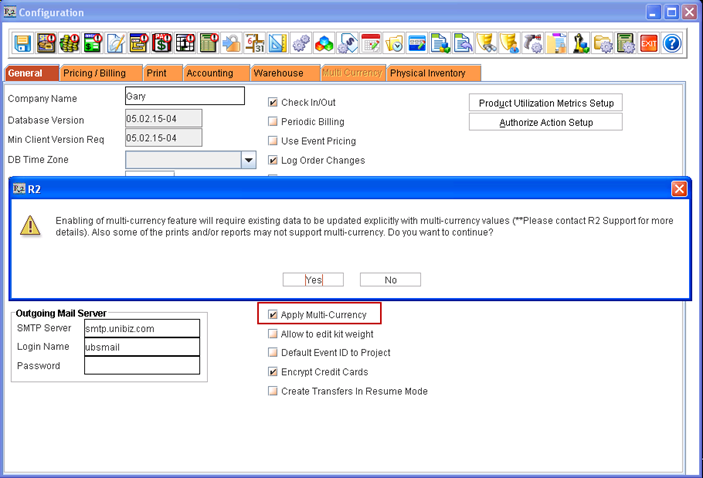
Steps after enabling Multi-currency:
On enabling Multi-Currency feature in R2, it is required to update the existing amount values based on multi-currency rate definitions.
This can be done through an executable script provided by UBS. For more information on the availability and usage of script, contact R2 Support.
In R2, the multi-currency based print is not supported for all prints and reports (Standard Reports and Custom Reports). Customer specific amount CID's need to be explicitly supported.
Terminology related to Multi-Currency
-
Base currency is considered as the primary currency or accounting currency for a company. While generating reports, the user can generate reports based on the Base Currency selected. This is defined in the Multi-Currency tab in the Configuration Module. See here
-
Site currency is the default currency selected for the site. Whenever an order is created, currency selected in the site will be considered. This is defined while creating or editing a Site's detail. See here
-
Transaction Currency is the currency defined by a business for its Company/Customer/Vendor. This is defined in the Access accounts tab in Customer/ Company / Vendor Edit window.
R2 Fields/Features with Fixed Currency types
R2 will always consider the value defined in Global/Regional fields (Fields which would be used for Multi-Currency calculation) always in Fixed currency type i.e., as either Base Currency/ Site Currency.