
Pricing
The Pricing List screen displays pricing records for inventory items and is accessed from multiple areas in R2, including Orders, Inventory maintenance, Transfers, and Item Search. This screen allows you to view, search, filter, and manage pricing information for different inventory types.
Pricing List Screen
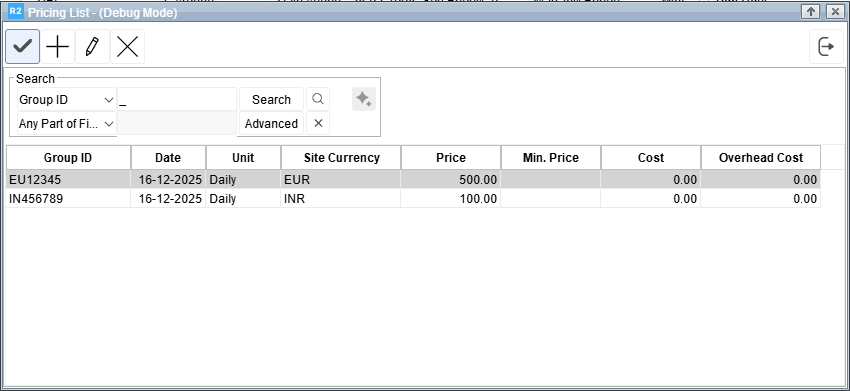
Figure 1.0 Pricing List Screen
Toolbar
The toolbar provides quick actions for managing pricing records:
Add (+) – Create a new pricing entry.
Edit (✎) – Modify the selected pricing record.
Delete (✕) – Remove the selected pricing record.
OK (✓) – To add the selected pricing.
Search Panel
The Search panel allows users to quickly locate pricing records using different criteria.
Search By dropdown - Allows you to choose the field to search on (for example, Site Currency or other available fields).
Search Value field - Enter the value to search for. Searches are not case-sensitive.
Search button - Executes the search based on the selected criteria.
Advanced - Opens advanced search options to refine results further using multiple conditions.
Clear (X) - Clears the applied search criteria and displays all records.
Pricing List Grid
The Pricing List grid displays all pricing records in a tabular format. Each row represents a pricing entry.
Site Currency - Displays the currency code associated with the pricing record. This column is visible only when multi-currency is enabled in R2.
Group ID - Indicates the pricing group to which the pricing record belongs.
Date - Displays the effective date of the pricing entry.
Unit - Displays the unit of measure for the pricing (for example, Daily).
Price - Displays the primary price value defined for the pricing record.
Min. Price - Displays the minimum allowed price for the pricing entry, if applicable.
Cost - Displays the cost value associated with the pricing record.
Overhead Cost - Displays the overhead cost defined for the pricing record.

All visible columns, including Site Currency and Overhead Cost, are searchable and filterable.
You can customize the grid layout, such as showing or hiding columns.
Standard add, update, and delete actions apply to pricing records from all access points where the Pricing List screen is available.