
Reference No: AHI-6
Version No: 06.01.02-00
This functionality works in the following sequence.
-
Below changes are made to Summary Invoice Support to Create a Summary Credit or Summary Debit automatically when a Summary Invoice is credited or debited.
-
Based on Type of Summary Invoice (Invoice, Credit or Debit) the appropriate IDS will be assigned on posting.
-
Support to identify and set sub type for a Summary Invoice as: Invoice / Credit / Debit.
Feature Design:
-
In the 'Configuration Module', the flag 'Allow to add CR/DB Memo to Summary Invoice' has been removed. Instead a drop-down list named Summary Type is added in Summary Invoice Screen. This will have following values - Invoice, Credit, Debit. [See Section: Support for Summary CR/DB]
In the same screen, Summary Credit/Debit Memo is searchable using the 'Summary Credit/Debit ID' in the 'Invoice ID' field.
Feature Functionality:
-
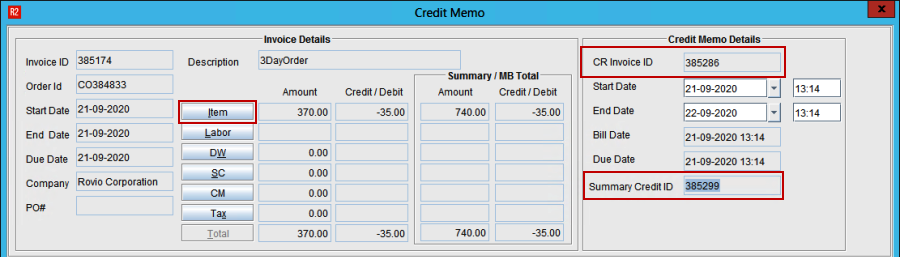
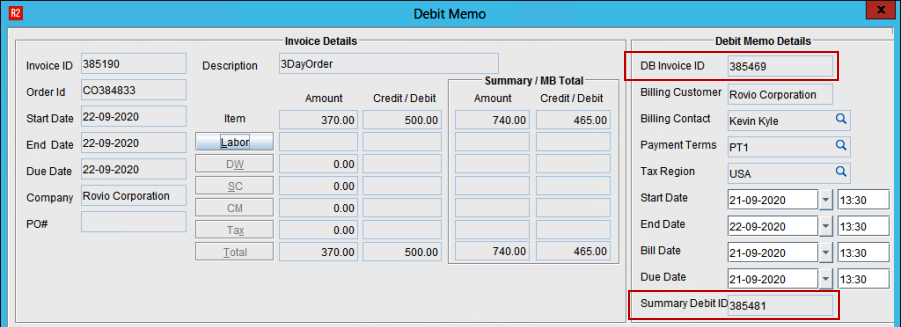
Summary Credit/Debit ID Field has been added in the Credit/Debit Memo Screens respectively.
-
When Summary Invoice Screen loads, the Default 'Summary Type', will be Invoice. This later-on can be changed, or changes automatically based on Credit/Debit Invoices being generated/displayed.
-
Invoice/Credit/Debit type have been supported in SAP-F2 export. [See Section: Integration With SAP-F2]
Workflow:
-
Open a posted Summary Invoice batch having few Invoices
-
Raise a Summary Credit and Summary Debit memo for the Summary Invoice
-
This will create a Summary Credit [See Figure 1.0]
-
Summary Debit [See Figure 2.0]
-
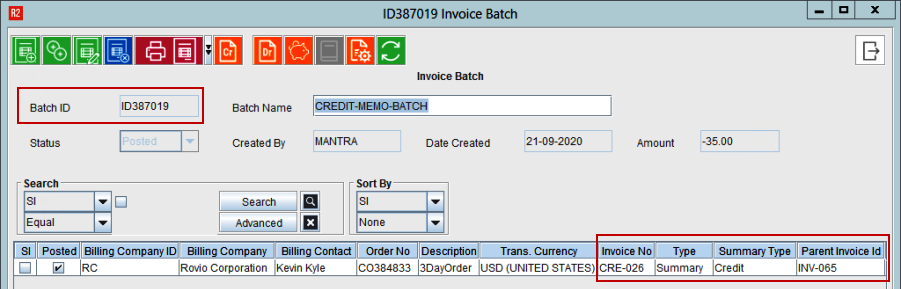
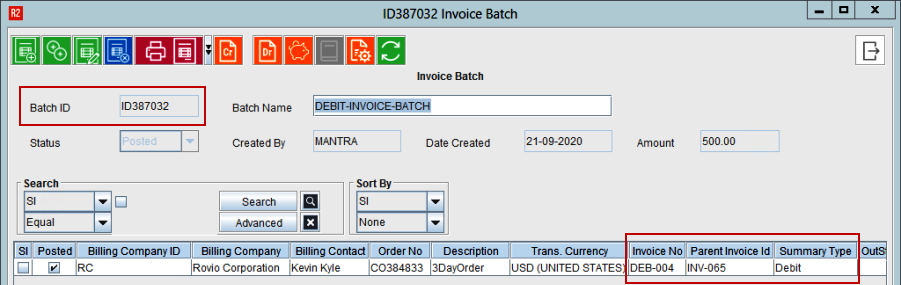
Post the Summary Credit Memo and Summary Debit Memos using the Summary Credit and Debit IDs
-
Upon Posting, Summary Credit Memo [See Figure 3.0]
-
Summary Debit Memo [See Figure 4.0] will consume the ID from the respective IDS set for these types
Upon creating Summary Invoice batch, if Summary Credit or Summary Debit has to be generated manually, appropriate Invoice Type must be selected manually.