
To Add new Commission Group
-
Go to Maintenance > Items > Select any item > Select Yes
-
Click on the import button next to Commission Group.
-
Commission Group dialog will be displayed.
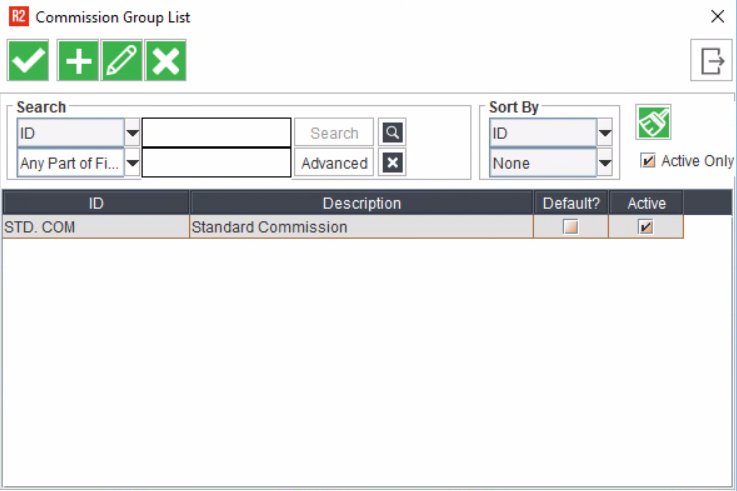
-
Click Add.
-
Add Commission Group dialog displays.
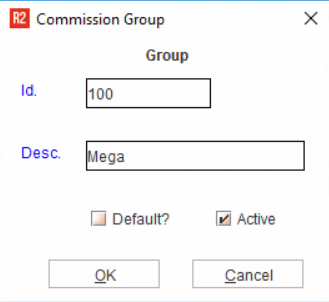
-
Enter the Commission Group Id.
-
Enter the Description.
-
Select Default check box to make the new group as default group.
-
Click OK.
If you have already defined a group as default, then the subsequent groups you add will have the Default check box inactive.
To Edit Commission Group
-
Click on the import button next to Commission Group.
-
Commission Group dialog will be displayed.
-
Search for the customer record you wish to edit.
-
Click on record to make it active.
-
Click Edit.
-
Edit Commission Group dialog will be displayed.
-
Update the changes.
-
Click OK.
To Delete Commission Group
-
Click on the importable button next to Commission Group
-
Commission Group dialog will be displayed.
-
Search for the customer record you wish to delete.
-
Select the record
-
Click Delete.
-
R2 will prompt for confirmation.
-
Click Yes to delete the group , No to cancel the delete process.
-
Click OK to close the window.