Content was last updated in 06.00.06-00
Revision History
Version No.
|
Reference No.
|
Changes
|
|
06.00.06-00 |
R2-8560 |
Display required widgets in R2Labor crew dashboard |
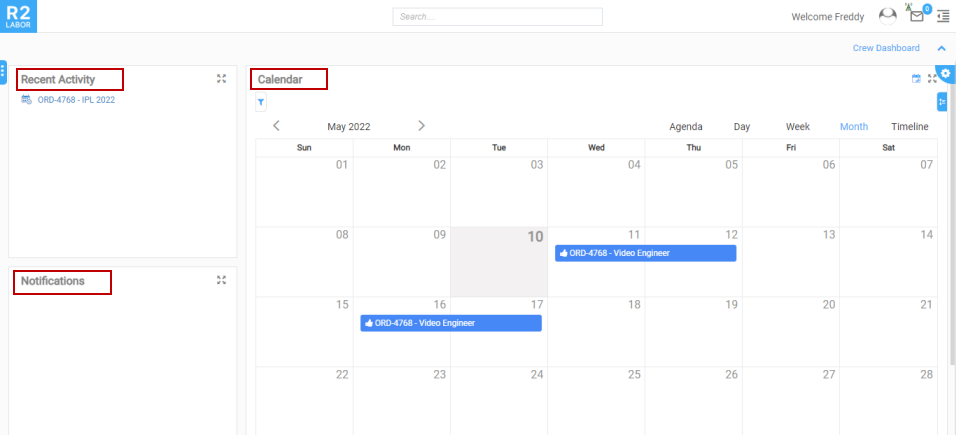
The R2 Labor Crew Dashboard is supported with the following widgets and accessibilities:
-
Notification: Displays Alerts and Notifications related to Crew or Employee.
-
Recent Activity: Displays the recent activities related to the Crew or Employee.
-
Quick Launch: Displays Quick links to CRM options.
-
Calendar Widget: Displays Events and Availability.
Table 1.0 Widget accessibility
|
Sl. No. |
Access |
Dashboard |
|
1 |
Super User (Employee with security group SUPERUSER) |
All Dashboards. |
|
2 |
Planner (Employee with Position Planner and Is Resource Also true/false) |
Dashboards created self or assigned to Planner/user. |
|
3 |
Project Manager (Employee without Planner Position and Is Resource Also false) |
Dashboards created self or assigned to PM/user. |
|
4 |
Employee (Covered in above three cases) |
Dashboards created self or assigned to PM/user. |
|
5 |
Employee & Crew (Employee without Planner Position and Is Resource Also true) |
Crew Dashboard |
|
6 |
Calendar Widget (My Calendar) |
Crew Dashboard |
|
7 |
Crew (Other than employee only resource) |
Crew Dashboard |
|
8 |
Contact (company contact) |
Portal Dashboard |
The Crew Dashboard is displayed, as shown in Figure 1.0.