
Content was last updated in 06.22.05-00
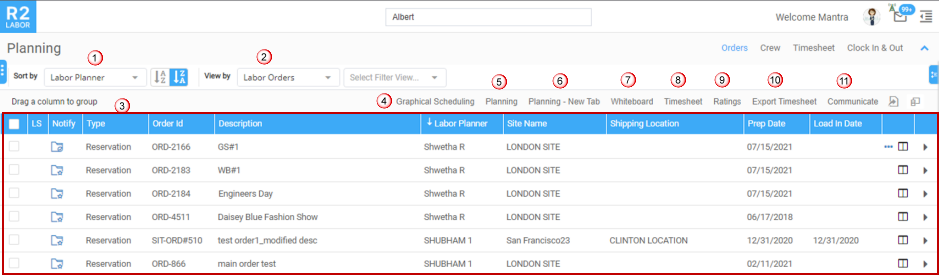
The Order Search window, is exactly what the name suggest. A grid of Order search results based on the parameters as provided by you. You can search the order here and open in any interface (Planning Order/ Whiteboard/Graphical Scheduling) for planning and more..
-
Sort By: The search window gives you the option to 'Sort' the results in both ascending/ descending order based a list of parameters (of which only one can be selected at a time).
-
View By: view the records based on the 'Labor Orders' or by 'Service Orders'.
-
Order records: Displays the Order list created in R2. For each of the order, a 'Quick View' icon is provided to view the order details.
-
Graphical Scheduling: View all the Orders along with their labor assignments in a calendar like structure.
-
Planning: View the Order along with their labor assignments in a tabular-grid format. You can edit the Order details if required.
-
Planning New Tab: Opens the Order along with their labor assignments in a tabular-grid format in a new tab.
-
Whiteboard: View all the Orders along with their labor assignments in a dashboard format.
-
Timesheet: View the Timesheet details. If Timesheet is not created, system lets you to create one.
-
Ratings: Ratings can be provided for the resources added on the order. Know more?
-
Export Timesheet: To download the Timesheet in excel format.
-
Communicate: To communicate with the resources added to the selected order. Know more?