Content was last updated in 06.22.04-00
Revision History
Go to Configuration Module >> General Tab >> Click Valid Till Offset setup button.
-
In the 'Valid Till Offset Setup' dialog box, click on the 'Add' button.
-
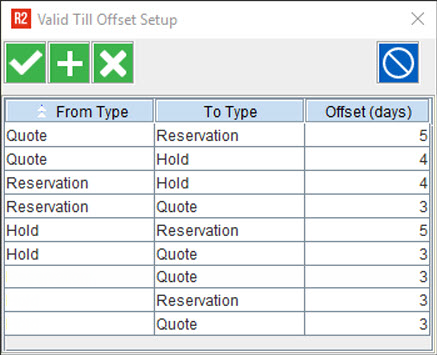
Select the 'From Type' and 'To Type' from the respective drop-down list and give 'Offset (days)' value.
-
Repeat the above step to add multiple 'From Type' and 'To Type' values with their corresponding 'Offset (days)' value.
-
To add 'Valid Till Offset' for an order creation instance, leave the 'From Type' as blank, and select the order type in 'To Type'.
Validations done while setup
-
The default value defined for 'Offset (days)' is zero.
-
The following scenarios will throw error.
-
If you try to set a 'Negative' value for 'Offset (days)'.
-
If you try to add multiple entries for the same pair of conversion.
-
If you try to add a conversion between same 'From Type' and 'To Type' value.
-
If you try to give a 'Fractional' value for 'Offset (days)'.
-
If you try to give an 'Non-numeric' value for 'Offset (days)'
-
-
-
Click 'Ok' to save the list. Click 'Close' button or just tab-out from the window, to exit.
-
Once you have added several 'Valid Till Offset' settings, the dialog box should look like the following.