
The Item Pooling in the Serial Kit is explained below.
-
Select the Maintenance module > Items tab > Kits tab.
-
Click the Site Importable button within the Maintenance window and create Kits [LG SERIAL KIT-1] and [LG SERIAL KIT-2] in the Sites [MUNICH] and [PARIS] and receive Assets as follows:
Table 1.1 Receive the Assets for the Kits [LG SERIAL KIT-1] and [LG SERIAL KIT-2] in the Sites [MUNICH] and [PARIS]
|
Site Name |
Kit Name |
Item [LG STAR] Asset Name |
Item [LG WM] Asset Name |
|
MUNICH |
LG SERIAL KIT-1 |
LG STAR-07 |
LG WM-07 |
|
LG STAR-08 |
LG WM-08 |
||
|
LG SERIAL KIT-2 |
LG STAR-09 |
LG WM-09 |
|
|
LG STAR-10 |
LG WM-10 |
||
|
PARIS |
LG SERIAL KIT-1 |
LG STAR-11 |
LG WM-11 |
|
LG STAR-12 |
LG WM-12 |
||
|
LG SERIAL KIT-2 |
LG STAR-13 |
LG WM-14 |
|
|
LG STAR-13 |
LG WM-14 |
-
Save and Exit the Maintenance module.
-
Set the System Date [03-May-2018].
-
Login to the R2 application with the Site [PARIS].
-
Select the Account module. The Account window is displayed.
-
Tag a Company [LG].
-
Click the Reservation icon. The Order Information dialog box is displayed.
-
Create a Rental Reservation Order [ORD-369] for 5 days duration with the Start Date [07-May-2018], Start Time [09:00 AM] and End Date [12-May-2018] End Time [09:00 AM].
-
Select the Dates tab > click the Edit Dates button. The Order Dates window is displayed.
-
Select the Search menu > Kits option. The Search Items window is displayed.
-
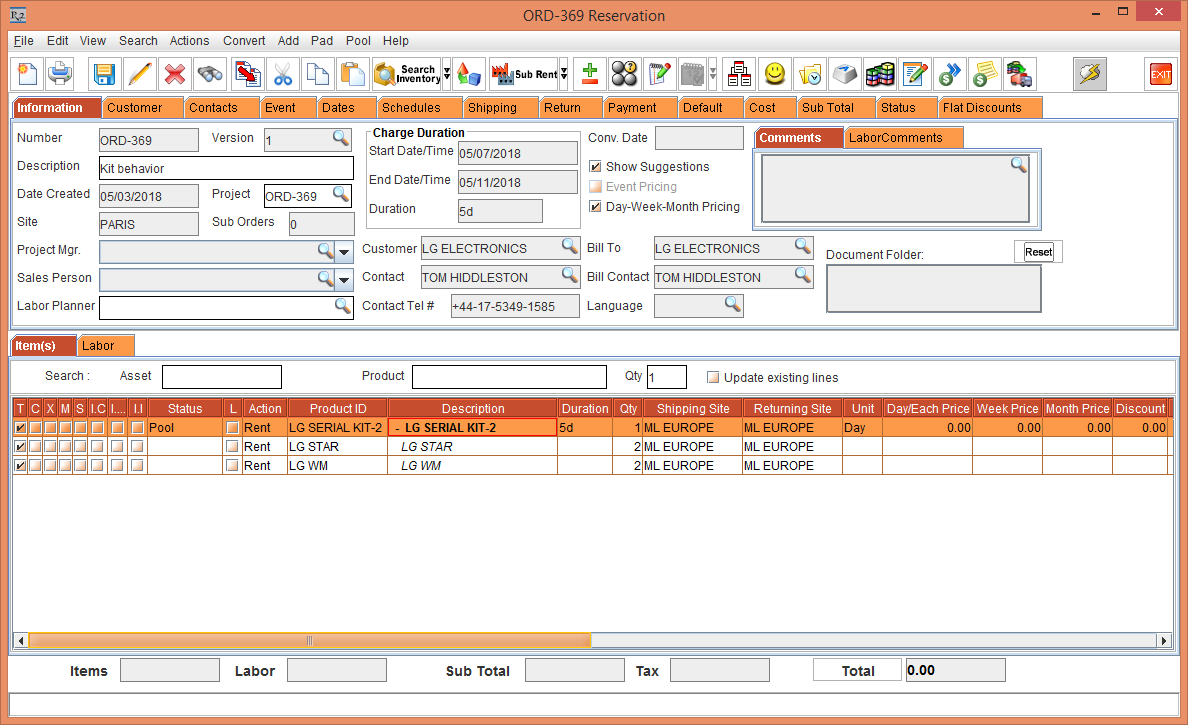
Search for the Serial Kit [LG SERIAL KIT-2]. The Kit Header [LG SERIAL KIT-2] with the Child Items [LG WM] and [LG STAR] along with the Shipping Site and Returning Site as the Sub-Region [ML EUROPE] is displayed, as shown in Figure 1.1.
-
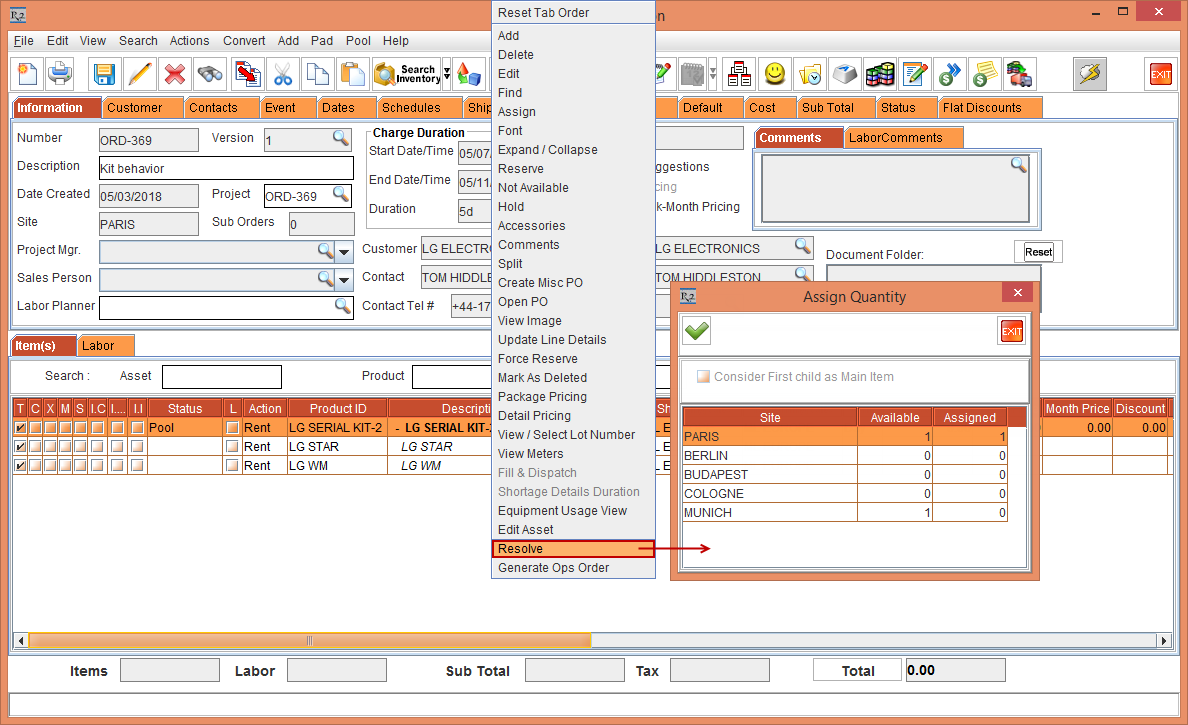
Select the Kit Header [LG SERIAL KIT-2], right-click and select the Resolve option. The Assign Quantity window is displayed, as shown in Figure 1.2.
-
Modify the Site [PARIS] Assigned Qty [0] and Site [MUNICH] Assigned Qty [1]
-
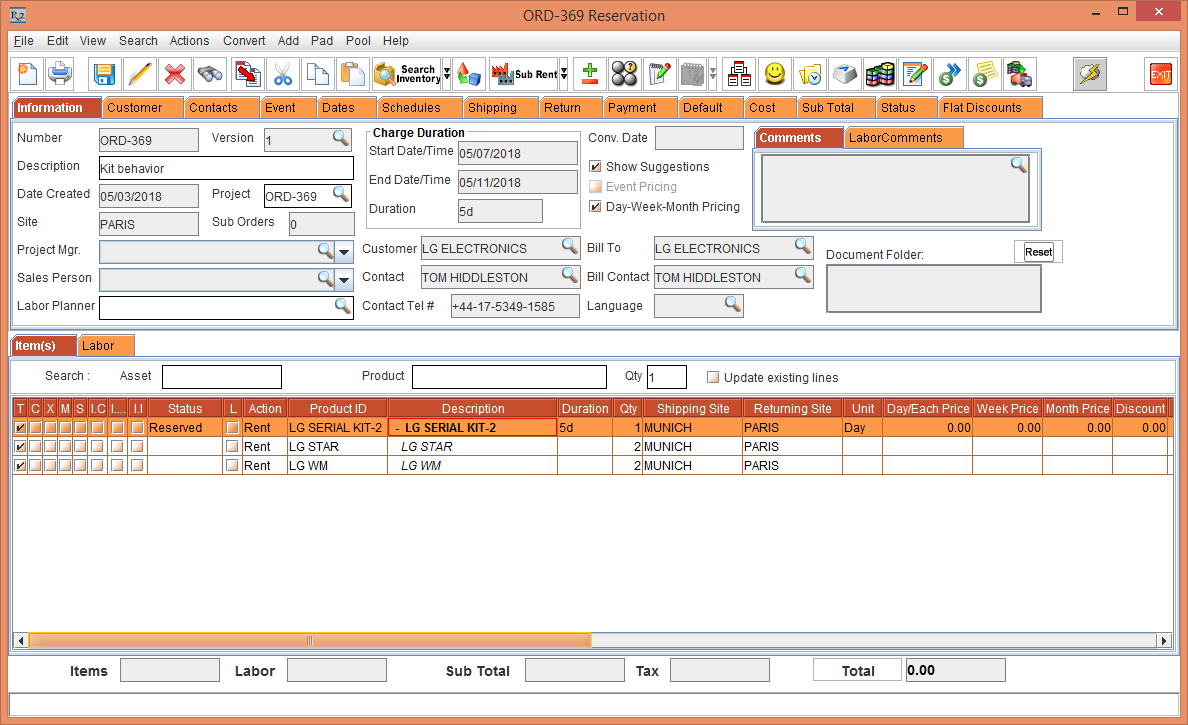
Click OK. The Shipping Site and Returning Site of the Kit Header [LG SERIAL KIT-2] with the Child Items [LG WM] and [LG STAR] is modified to Shipping Site [MUNICH] and Returning Site [PARIS] respectively, as shown in Figure 1.3.
-
After Resolving the Kit Header [LG SERIAL KIT-2], only the Shipping Site and Returning Site of the Kit Header [LG SERIAL KIT-2] can be modified which gets reflected to the Child Items [LG WM] and [LG STAR].
-
The Shipping Site and Returning Site of the Child Items [LG WM] and [LG STAR] cannot be modified individually.
-
The right-click and select the Resolve option is enabled only for the Kit Header [LG SERIAL KIT-2] and not the Child Items [LG WM] and [LG STAR].
-
The Pool menu > Resolve option functions similar to that of a normal Item.