Skip to main content
R2 Core
Release Calendar
Latest Release Notes
UBS Support
06.26.05
06.26.04
06.26.03
06.26.02
06.26.01
06.25.13
06.25.12
06.25.11
06.25.10
06.25.09
06.25.08
06.25.07
06.25.06
06.25.05
06.25.04
06.25.03
06.25.02
06.25.01
06.24.13
06.24.12
06.24.11
06.24.10
06.24.09
06.24.08
06.24.07
06.24.06
06.24.05
06.24.04
06.24.03
06.24.02
06.24.01
Main navigation
R2 Core
Close navigation
06.26.05
06.26.04
06.26.03
06.26.02
06.26.01
06.25.13
06.25.12
06.25.11
06.25.10
06.25.09
06.25.08
06.25.07
06.25.06
06.25.05
06.25.04
06.25.03
06.25.02
06.25.01
06.24.13
06.24.12
06.24.11
06.24.10
06.24.09
06.24.08
06.24.07
06.24.06
06.24.05
06.24.04
06.24.03
06.24.02
06.24.01
Main
Release Calendar
Latest Release Notes
UBS Support
Main
Launch Pad
Modules
Accounts
Warehouse
Invoicing
Service
Physical Inventory
Physical Inventory Introduction
Options to run physical inventory
Viewing Discrepancy
Adjusting the assets with discrepancy
Adjusting non serial items with discrepancy
Inventory Reports
Supporting the Bin and Shelf Columns
Capture the Comments while adjusting the Item from Missing/Lost to IN
Exclude the Filled Items to avoid discrepancy
Tag All Items or Clear All Tagged Items
Maintenance
My Activity
Reports
Security
General
Miscellaneous
Configuration
Intelligent Search (Powered by AI)
Barcoding
Version Compatibilities
Form Templates
Form setup
DOCX Print
R2 Reports (Beta)
Lots
Customizations
Accounting Integrations
Breadcrumbs
Home
R2
Modules
Physical Inventory
Physical Inventory Introduction
On this Page
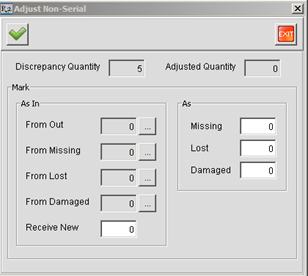
Adjusting non serial items with discrepancy
Enter the discrepancies and click on the OK button