
-
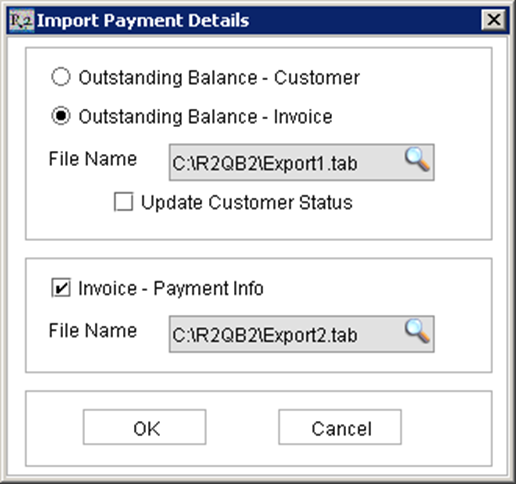
To import customer payments from QuickBooks, begin in the R2 Invoicing module. Click on the Import Invoice Payment Details icon.
-
Select “Outstanding Balance – Invoice”
-
In the top section, select the file name of “Export1.tab”.
-
Click on the checkbox for “Invoice – Payment Info”
-
In the lower section, select the file name of “Export2.tab”.
-
Click on the OK button to process.
To verify invoice payments have been successfully imported, start at any invoice search screen:
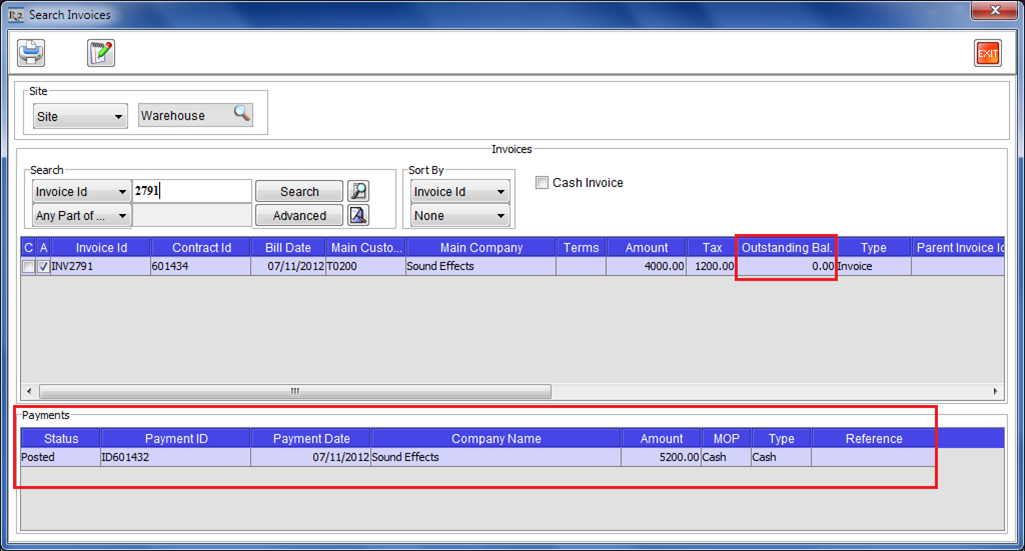
When highlighting the invoice in the top section of the search screen, the payment(s) for that invoice will be displayed in the lower “Payments” section.