A Purchase Order (PO) Policy is a combination of Purchase Order (PO) Type, Department it has been raised from, Site it belongs to, and the Currency it is raised in.
A policy approval may be linked to a specific person (Employee) or any person who is at a specific profile (Position), or the Project Manger (PM)/ Labor Planner (LP) of the Order the PO is attached to.
Apart from this, in the absence of the primary Approver, if a designate has been assigned, the Delegate is also eligible to approve the Purchase Order.
To view the existing list of Purchase Order (PO) Policies,
Go to R2> Launch Pad > Security > Policies > Purchase Order.
To start defining a new Policy Header, in the PO Policy List Window, click the New button, or you can click the Edit button if you are modifying an existing definition.
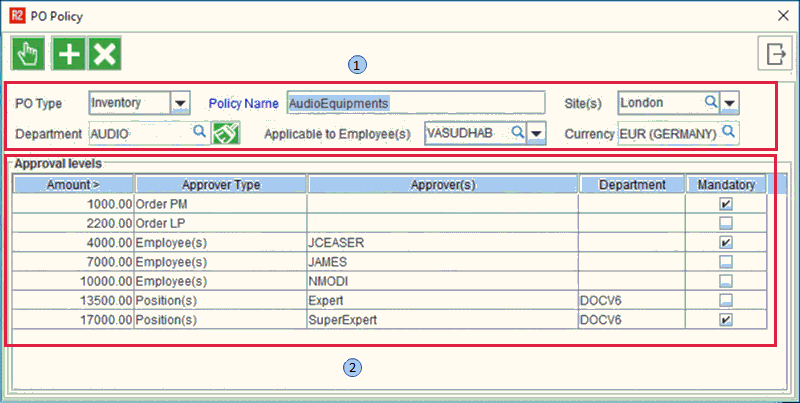
Defining a Purchase Order (PO) components from above image.
Policy Header
There six important criteria to be defined in the PO Policy.
-
PO Type: This represents the type of purchase orders. This also includes the custom PO types.
For Subrent select Po type as subrent.
-
Policy name: Policy name is summary of the policy being defined.
-
Site(s): Site defines different geographic or physical location business operates from. Multiple sites can be tagged here.
-
Department: The department tagged here indicates the department in which the PO is raised .
-
Applicable to Employee(s): This defines to whom the policy is applicable to. Multiple employees can be tagged here.
-
Currency: The amount defined in the policy is in this currency. This is however applicable only when multi-currency is turned on in the configuration Module.
Approval Header
There are five parameters in a approval level. To start defining a new Approval Level, in the PO Policy List Window, click the New button, or you can Edit an existing Policy Level, by directly clicking on the fields and change them.
-
Amount: Each approval level has an upper and lower threshold amount limit for approval of PO.
-
Approver type: The approver type belongs to the approver of PO policy, different types of approvers are shown below.
|
Approver types |
Description |
|
Employee(s) |
Named people from the organization. |
|
Position(s) |
People at specific positions. |
|
Order PM |
Project Manager of the Order, for which the PO was raised. |
|
Order LP |
Labor Planner of the Order, for which the PO was raised. |
-
Approver(s): Approvers are one who approves the PO Policy.
-
Department: Department to which the approver belongs.
-
Mandatory: Mandatory field can be set as mandatory for one or more approver's to approve the PO.
Important Point:
-
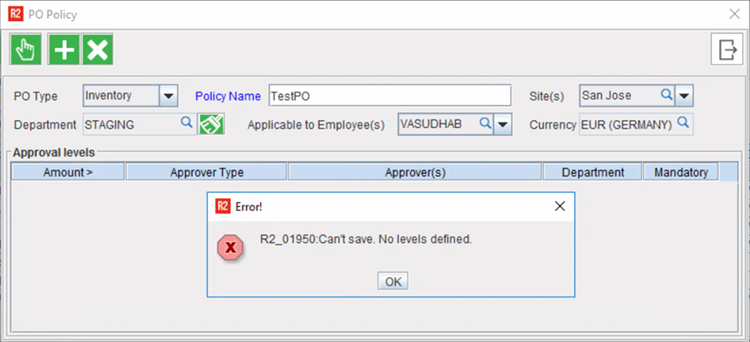
R2 'does not allow to define a PO Policy, if there are no 'Approval Level' defined under it.
-
If you try to 'Save' a PO Policy header without any 'Approval Level' under it, R2 will display the following error prompt.