
Managing the Company Information
Company refers to the business entity with whom you are going to conduct business through any project/event/rental/sale. A company can be a Corporation, a Government organization, a 3rd-party vendor, or even an individual.
You can add and maintain companies information here. To create a company record, you must mandatorily provide a unique name, a company type, at least one contact person's information.
The companies added, transverse through a process from Suspect > Lead > Prospect > Customer. However, it is not necessary for you to follow the process, you can change the phase to the other one at any time.
Once the company has reached a Customer phase, the company information in your CRM can be pushed to R2 application thereby avoiding manual entry of company information in R2.
The Company search window tabs
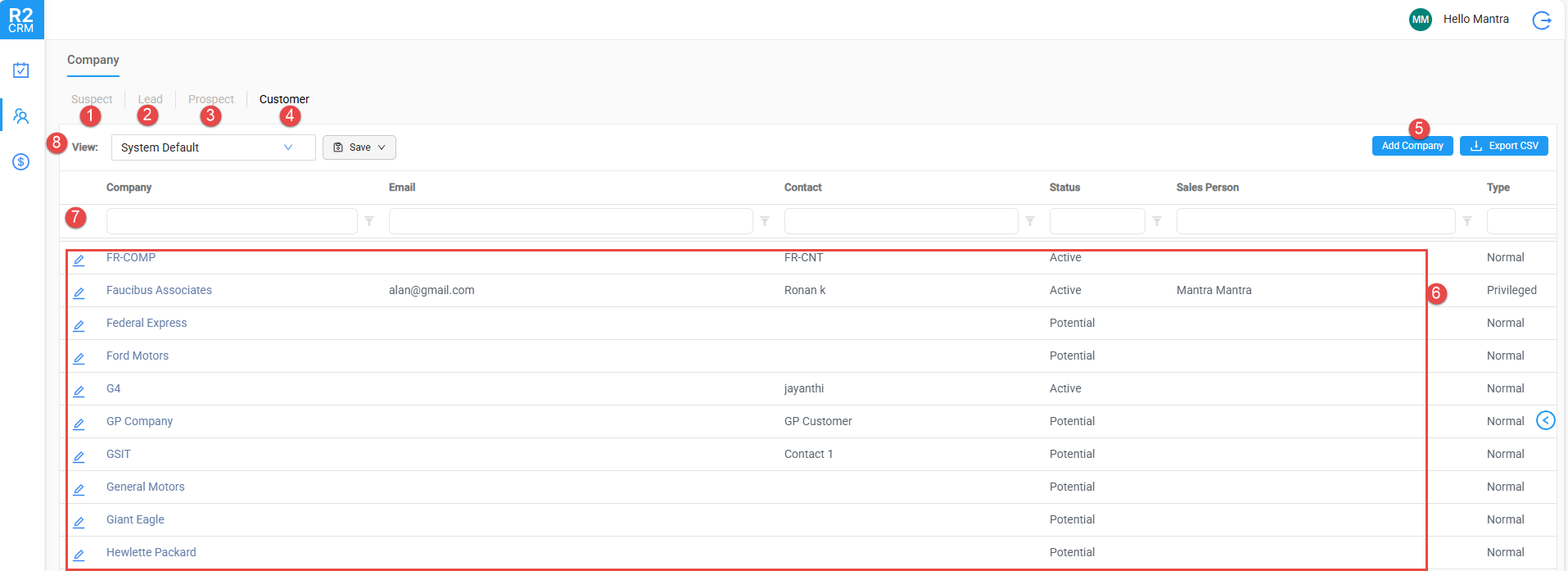
The Company search window consists the following:
-
Suspect: This tab contains the suspect customers list.
-
Lead: This tab contains the lead customers list.
-
Prospect: This tab contains the prospect customers list.
-
Customer: This tab contains all the customers list who are agreed and started business with you.
-
Add Company: To add a new company information. know more?
-
Company records: Displays the companies list based on which tab you are currently in. For example: If you are in 'Customer' tab, then you can only view the data of a company who are customer for you.
-
Search grid: To search the company through the search grids which are available in each column headers of the table view. Know more about search grids.
-
View: You can save your preferred filter and sorting settings as User Views.