
Content was last updated in 06.23.07-00
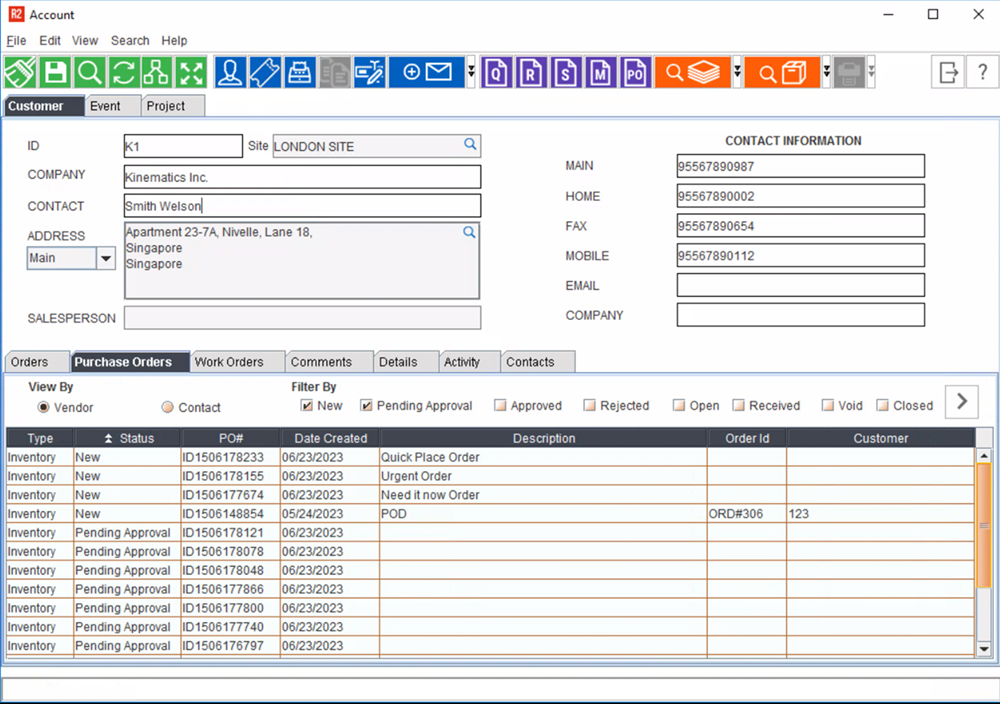
Purchase Order tab displays the Purchase Order list for the selected vendor, with which you can track the status of the purchase order.
You can also open any of the listed Purchase Order by double-clicking on it.
Features
View By
-
Vendor : if selected, R2 will display all the purchase orders created for the selected vendor.
-
Contact : if selected, R2 will display the purchase order history based on the contract selected.
Purchase Order Tab Filter Options

|
Filter Option |
Description |
|
New |
Selecting this option will display all the purchase order which are in 'New' status for the selected vendor. |
|
Pending Approval |
Selecting this option will display all the purchase order which are in 'Open' status for the selected vendor. |
|
Approved |
Selecting this option will display all the purchase order which are in 'Open' status for the selected vendor. |
|
Rejected |
Selecting this option will display all the purchase order which are in 'Open' status for the selected vendor. |
|
Open |
Selecting this option will display all the purchase order which are in 'Open' status for the selected vendor. |
|
Received |
Selecting this option will display all the purchase order which are in 'Received' status for the selected vendor. |
|
Void |
Selecting this option will display all the purchase order which are in 'Void' status for the selected vendor. |
|
Closed |
Selecting this option will display all the purchase order which are in 'Closed' status for the selected vendor. |
On selecting the required display option, click on the Refresh Icon to update the purchase order tab view.
Purchase Order Tab - Column Grid Information

Column
|
Description
|
|
Type |
Type field displays the Purchase Order type definition. Available definitions are Inventory, Sub-Rent, or Misc . |
|
Status |
Displays the status of purchase order.
|
|
PO # |
Displays the purchase order ID. |
|
Description |
Displays the purchase order description. |
|
Date Created |
Displays the date on which the purchase order is created. |
|
Order ID |
If the purchase order is created for any order, then respective order id will be displayed. If purchase orders are created independent of any order, then the field will be blank. |
|
Customer |
If the purchase order is created for any order, then customer in the order will be reflected in this column. |