
Content was last updated in 06.23.07-00
Revision History
Version No.
|
Reference No.
|
Changes
|
|
06.23.07-00 |
R2-19956 |
Separating Lost/Missing items in Configuration. |
Any order has print options, Employee can decide and customize what needs to be print, hidden, sort, aligned during printing bill or order details.
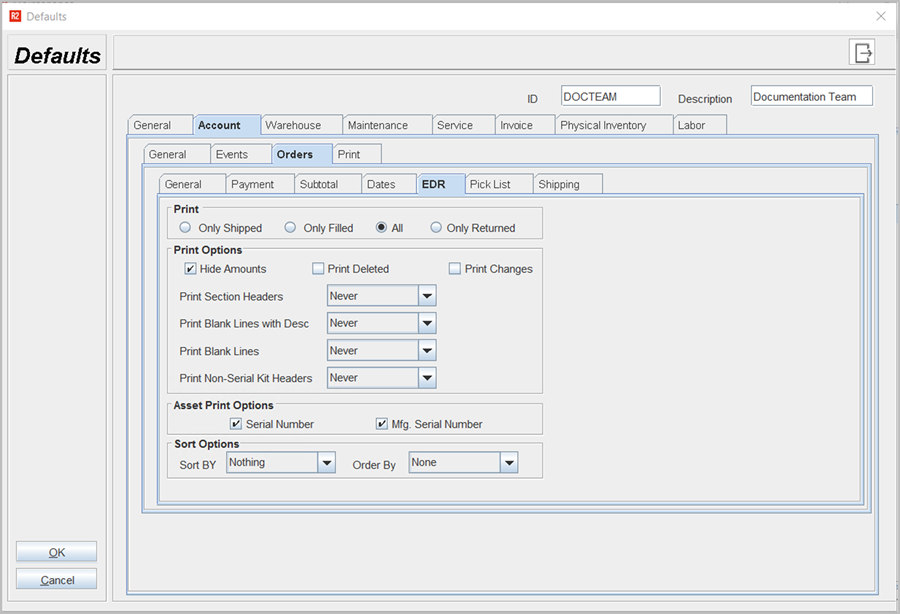
Table 1.0 Set Printing options
|
Fields |
Sub-fields |
Field type |
Description |
|
|
|
Select Options |
You can select any option to print order details such as:
|
|
Print Options |
|
Select Options |
You can set invoice details to print as by hiding amounts, print deleted orders, print changes of order. |
|
Select from Drop down |
You can select any one option either 'Never' or 'Always' |
|
|
Asset Print Options |
|
Select check box |
You can set print options for assets by serial number or Mfg serial number |
|
Sort Options |
|
Select from Drop down |
You can define the Sort By and Orders by sequence in Order Prints by selecting the following options
|