
Table of Contents
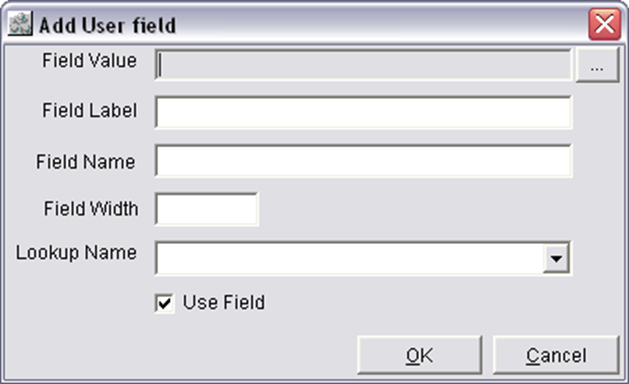
In the 'Add User field' dialog the you can define a new field based on the existing fields.
To Add User Field
-
In the Report Def tab of the Report Assistant Configuration Window, click on the User Fields button.
-
The Add User field dialog will be displayed.
-
Click on the Ellipses button next to the 'Field Value' field.
-
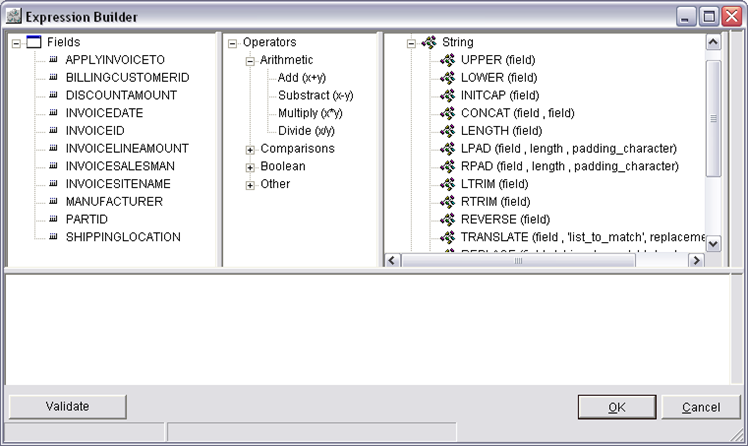
The Expression Builder window will open.
-
In the third column of the first grid, double click on any option of the function String/Numeric/Date.
-
The selected option of the function will be displayed in the lower grid of the Expression Builder window.
-
Within the bracket displayed in the lower grid, define the field based on the fields displayed in the first column of the window.
-
Click on the Validate button will display the Report Assistant dialog and click on OK.
-
In the Field Label field, define a display name for the newly created field.
-
In the 'Field Name' field, define a Field name for the newly created field.
-
Define the Field Width and select a Lookup Name from the drop down list and click on OK.
Field Information of Add User field
Field Value
On clicking on the ellipses button next to the 'Field Value' field, system will display the Expression Builder window, wherein the user can define their own new field.
Field Label
In the Field Label field you can define the display name for the newly created field.
Field Name
In the 'Field Name' field, you can define a Field name for the newly created field
Field Width
In the 'Field Width' field, you can define the width of the field.
Lookup Name
In the Lookup Name field, your can select a Lookup name from the Drop Down list for the field.
Use Field
On selecting the Use Field Check box, the field will be displayed while generating the report else it will not be displayed.