
-
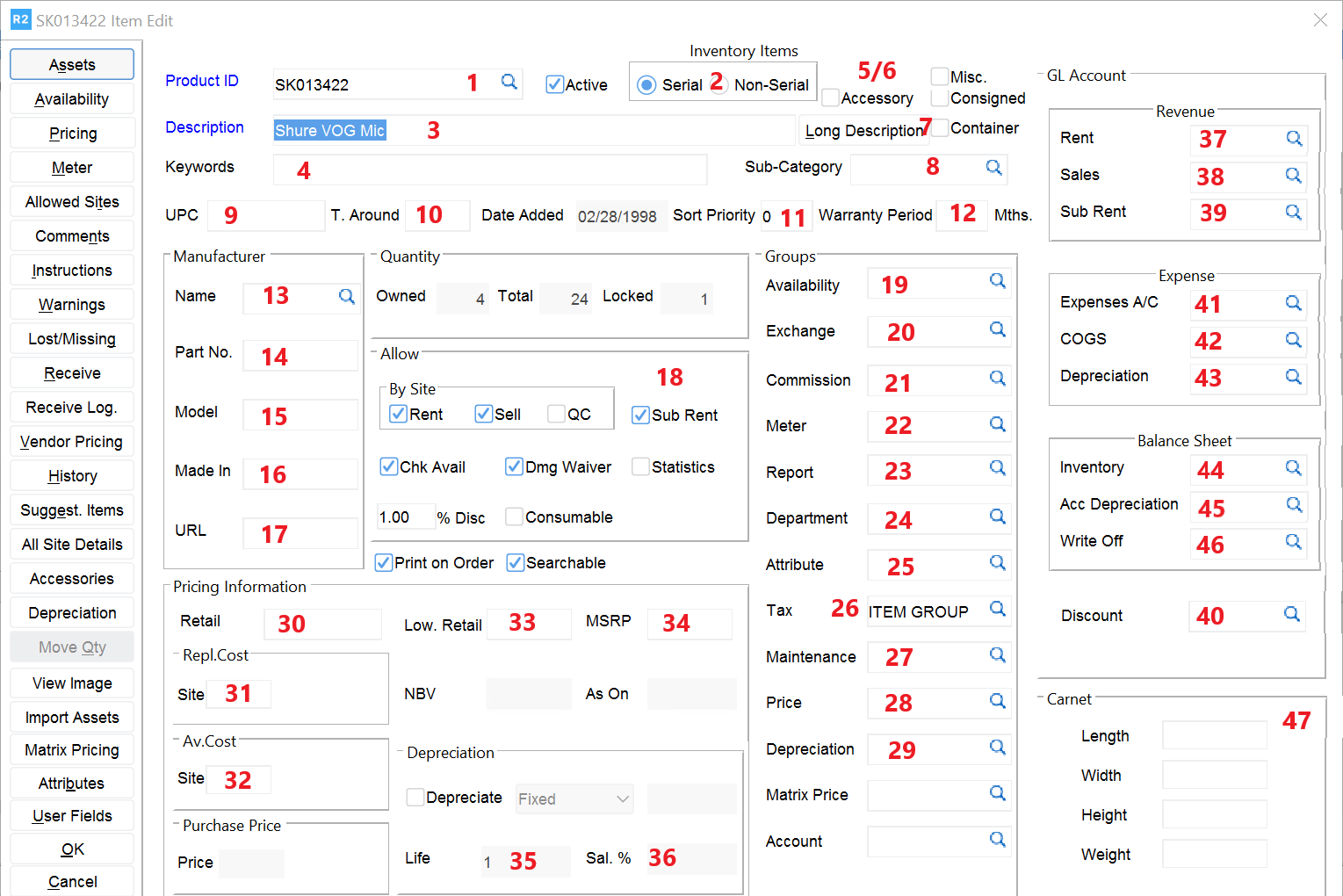
Product ID Mandatory: SKU, a number your company uses to identify this item
-
Serial/Non-Serial Mandatory: if the item is serialized, the quantity you own is each represented by an additional serial number known as an Asset ID. Non-Serial items are quantity-based
-
Description Mandatory: describe the item, 100 characters maximum
-
Keywords Words that may be used to search for an item if the description is not sufficient
-
Misc. A misc. item, when added to an order, asks that you give it a description. It is typically used for items you do not regularly carry and may need to sub-rent each time
-
Accessory Marks the item as an accessory
-
Long Description This description field holds up to 2,000 characters
-
Sub Category Used to categorize your items for the purpose of searching and organizing. A sub category allows you to define several parameters for an item, saving you time during data entry and giving you consistency in the process
-
UPC Universal Product Code (barcode) from the item, if available
-
T. Around
-
Sort Priority
-
Warranty Period
-
Name Manufacturer name
-
Part No. Manufacturer’s part number
-
Model Manufacture model
-
Made In Where the item manufactured
-
FCC Cod
-
Allow If any of the following are checked, it allows that function, if un-checked, the function on that item is disallowed
-
Rent Allows the item to be rented
-
Sell Allows the item to be sold
-
Sub Rent Allows the item to be sub rented
-
Chk. Avail. Checks the stock of an item before renting/selling
-
Depreciation Item is depreciable
-
Statistics Rental utilization statistics will be stored for the item
-
Discount Item is discountable – enter a maximum allowable discount percentage Consumable Consumable percentage applies to this item
-
Dmg. Waiver Damage Waiver percentage applies to this item Print On Order Item is printable
-
Searchable Item can be searched for rather than hidden (used in conjunction with “Active”)
-
Availability A broad grouping of items that assists in locating a like/kind item for the customer if another is not available (e.g. if a 20” monitor is not available, perhaps a 22” is)
-
Exchange A specific grouping of items that assists in locating another item of a specific type if one is not available (e.g. if a Sony 22” monitor is not available, you may be able to exchange it with a Hitachi 22” or a Samsung 22” monitor you also carry)
-
Commission A group used to identify commissionable items. Leave blank if you pay no commission
-
Meter A defined group used to track meter readings (e.g. hours on projector lamps)
-
Report A user definable group that can be used for reporting purposes
-
Department Department the item is identified with (e.g. Lighting, Projection, Stage)
-
Attribute
-
Tax Tax Group, used typically to identify whether an item is “Taxable” or “Non-Taxable”
-
Maintenance A defined group to track maintenance metrics used in Service and Repair
-
Price
-
Depreciation Depreciation schedules can be setup as groups
-
Retail When sold, this is the default sell price
-
Replacement Cost When an item is sold during a rental, it will use this price. If an item is not returned by the customer, this same amount can be charged to the customer as part of a Lost/Damaged Invoice
-
Average Cost Automatically calculated by R2 upon receiving inventory, it can be manually reset
-
Low Retail A hard bottom line to the retail price, the user cannot reduce the price past this
-
MSRP Manufacturer’s Suggested Retail Price
-
Life Life, in months, the item has for depreciation purposes
-
Salvage % The per cent salvage, based on the item’s cost, that depreciation will cease
-
Rent GL When rented, this is the GL code that will be used
-
Sales GL When sold, this is the GL code that will be used
-
Sub Rent GL When sub-rented, this is the GL code that will be used
-
Discount GL If the item is discounted, the discount dollars will go to this GL code
-
Expense GL If an item is sub rented it will send this GL code as an offset to payables
-
COS GL When an item is sold it will use this GL code as a Cost of Sale
-
Depreciation GL Depreciation GL code
-
Inventory GL When purchased, this GL code will be sent as an offset to payables. When sold, it will send this GL code as an offset to COS
-
Accumulated Depr. Accumulated Depreciation GL code
-
Write Off GL Not used
-
Carnet Length, Width, Height, Weight of the item as an individual unit