
The Find feature is used to search for a specific record in the grid selected for retirement.
To open the Find dialog box, click 
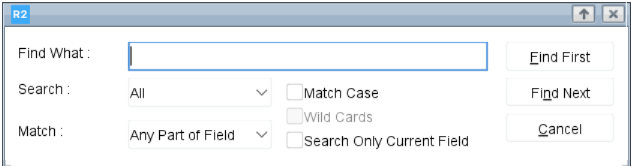
The Find dialog includes the following parameters:
-
Find What: Enter the text you want to search for within the grid.
-
Search: Choose one of the following options to define the search scope:
-
All: Searches all records within the grid.
-
Up: Searches upward from the current selection in the grid.
-
Down: Searches downward from the current selection in the grid.
-
-
Match:
Select how the system should match your search criteria:-
Any Part of Field – Matches records where the entered text appears anywhere within the field.
-
Start of Field – Matches records where the field value begins with the entered text.
-
Whole Field – Matches records where the entire field exactly equals the entered text.
-
-
Match Case: Select this checkbox to make the search case sensitive.
-
Search Only Current Field: Restricts the search to the currently selected field/column.
-
Find First: Navigates to the first record in the grid that matches the entered text.
-
Find Next: Moves to the next record in the grid that matches the entered text.