Reference No: R2-13794
Version No: 06.01.01-00
Details
This enhancement supports Flat look and feel with Dark/Light theme in R2
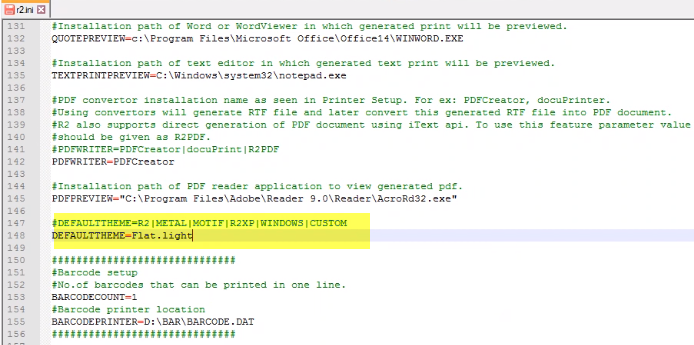
The Flat look and feel can be achieved by setting Default Theme parameter set either to FLAT.DARK OR FLAT.LIGHT in r2.ini
Prerequisites
-
Define the theme as
DEFAULTTHEME=Flat.Light in R2.ini file. -
Icons are used based on Themes set in Configuration.
Update DEFAULTTHEME in r2.ini as below
Sample Workflow
To change the theme, do the following:
-
Launch the R2 application, the new theme will be loaded.