
Reference No: R2-1203
Prior to Version to 06.00.02-00
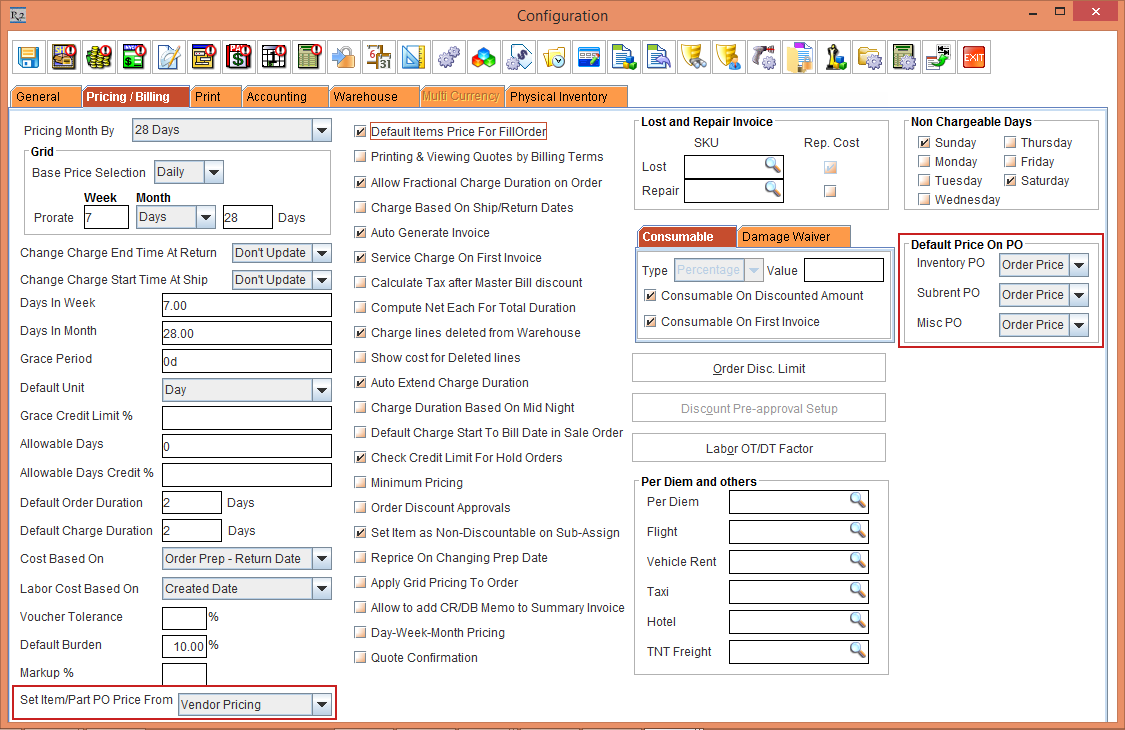
In the earlier releases, the display of the Set Item/Part PO Price From option and the Default Price On PO section to carry the Unit Price fetched by the Linked PO with the PO Type in the Configuration module > Pricing / Billing tab was displayed, as shown in Figure 1.0.
With Effect from Version 06.00.02-00
Now, the display of the Set Item/Part PO Price From option and the Default Price On PO to carry the Unit Price fetched by the Linked PO with the PO Type section in the Configuration module > Pricing / Billing tab has been combined to display as one section named as PO Price, as shown in Figure 2.0.
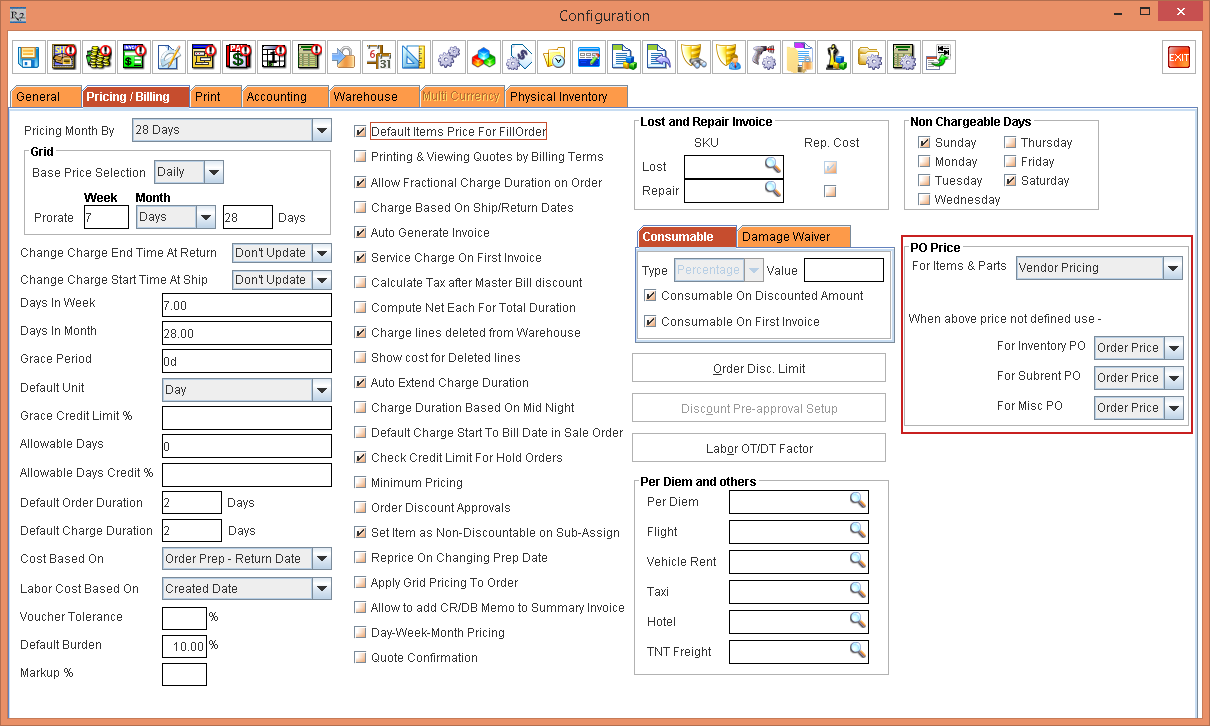
The defaulting of Price of an Item/Part to a new Purchase Order is based on the selection in For Items & Parts drop-down list in the PO Price section.
The functionality of the below three options in the For Items & Parts drop-down remains unchanged except for the display of the "Note: Not applicable for Subrent PO. Subrent PO uses Vendor Pricing." during the selection of the Site Purchase Price and the Product Purchase Price options.
-
Vendor Pricing
-
Site Purchase Price
-
Product Purchase Price
When the For Items & Parts drop-down is not defined, you can select any of the mentioned drop-down options from the "When above price not defined use -" within the PO Price section, as shown in Figure 2.0 and mentioned in the Table 1.0.
Table 1.0 "When above price not defined use -" options
|
When above price not defined use - |
Options |
Description |
|
For Inventory PO |
Order Price |
The Order Price defined in the Order is fetched as the Unit Price in the Inventory PO.
NOTE: If any of the Vendor Pricing, Site Purchase Price, Product Purchase Price, is not defined, the linked Purchase Order comprising of Rent Items always displays the Unit Price as "0" irrespective of the For Inventory PO drop-down options Order Price or Order Cost selection in the Configuration > Pricing / Billing tab > PO Price section. |
|
Order Cost |
The Order Cost defined in the Order is fetched as the Unit Price in the Inventory PO.
NOTE: If any of the Vendor Pricing, Site Purchase Price, Product Purchase Price, is not defined, the linked Purchase Order comprising of Rent Items always displays the Unit Price as "0" irrespective of the For Inventory PO drop-down options Order Price or Order Cost selection in the Configuration > Pricing / Billing tab > PO Price section. |
|
|
For Subrent PO |
Order Price |
The Order Price defined in the Order is fetched as the Unit Price in the Subrent PO. |
|
Order Cost |
The Order Cost defined in the Order is fetched as the Unit Price in the Subrent PO. |
|
|
For Misc PO |
Order Price |
The Order Price defined in the Order is fetched as the Unit Price in the Misc PO for the Misc Item line only. |
|
Order Cost |
The Order Cost defined in the Order is fetched as the Unit Price in the Misc PO for the Misc Item line only. |
Depending on the option's selected in the Configuration settings that are saved, the respective Price or Cost is pulled from the Order to the respective PO.