
Reference No: R2-13693
Version No: 06.01.00-00
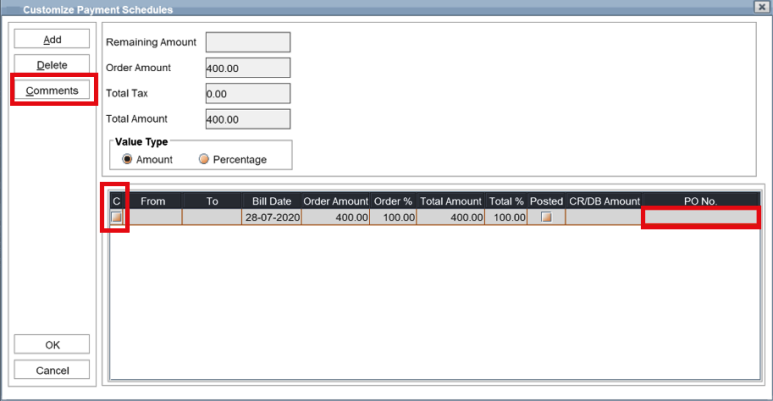
Support to enter Comments and PO# is provisioned in Custom schedule window as below
-
Highlight a schedule and click Comments button to enter the Comments.
-
The comments entered will be carried to the invoice generated/re-generated for selected schedule.
-
Checkbox column 'C', gets selected if comments are present.
-
If the schedule's invoice is Posted, System will allow to edit Comments.
-
-
Provision to enter PO#
-
Custom Schedule Grid, PO# can be entered under the PO No column in the Grid.
-
The PO# entered will be carried to the invoice generated/re-generated for selected schedule.
-
PO No. in the Grid defaults from the PO No. entered in the order for new schedules.
-
However, when the PO# is changed on the order, the same will not be get updated for the existing schedules or invoices.
-
-
If the schedule's invoice is Posted, System will not allow to add or edit PO No.
-
-
Option to enter PO# and Comments will be available in only in Main Order.
-
Comments entered against Invoice directly will be lost on Regenerating the Invoice.
-
Deposit Amount Adjustment and prompt for adjusting only when required.
-
If the Regenerated Invoices amount is same or more than the previously adjusted Deposit amount, System will not prompt the user to re-adjust the deposits.
-
If the Regenerated Invoices amount is less than the previously adjusted Deposit amount, System will prompt the user to re-adjust the deposits.
-
After auto re-adjusting the deposits, if any deposit amount is left un-adjusted, System will prompt the user to re-adjust the deposits.
-
Systems will not auto-generate Invoices for Custom billing order when changes are saved or when custom schedules are updated.
-
With this change, the process of generating the invoices for custom billing order will be manual.
-
This change will avoid the auto-removal of the deposits adjusted without users notice on regeneration of invoices.
-
System will retain the invoices within the Summary Invoice/AR Batches/MB, on regenerating the invoices irrespective of the Billing Type, provided Bill Date is same.
-
The attributes in the Summary Invoice/AR Batches/MB will not be lost on regenerating the Invoices.
-
Posted invoices will also be retained as is in the existing batches.