
Reference No: AHI-7
Version No: 06.01.03-00
Support for a script which will remove Invoices within an unposted AR Invoice batch.
-
System clears the values of UDF fields named 'Fulfillment Date' and 'Exchange Rate Date' of the Invoices removed from the batch except for Credit Memo/Debit Memo/Summary Credit Memo/Summary Debit Memo.
-
The UDFs ‘Fulfillment Date’ and 'Exchange Rate Date' must be defined with the exact alphabets as ‘Fulfillment Date’ and 'Exchange Rate Date’ (hardcoded).
Sample Workflow
-
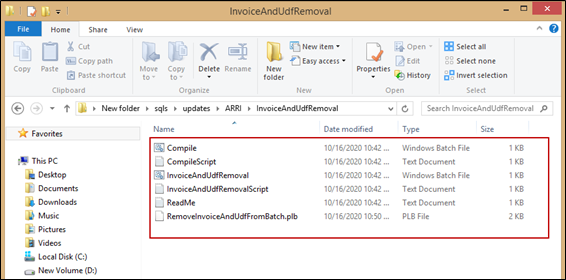
From latest release folder, copy the ‘InvoiceAndUdfRemoval' folder and paste in the local folder/drive.
File Path: SQLS > ARRI > Updates > InvoiceAndUdfRemoval
-
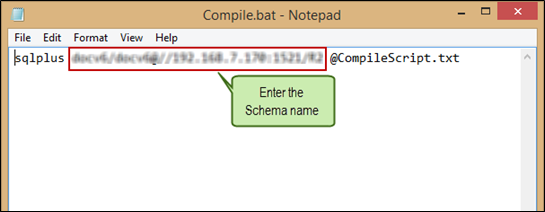
Edit the ‘Compile.bat’ file.
-
Enter the relevant DB Schema Details. (Ex: R2/R2@R2Service). Run the batch file.
-
Enter the Site ID in the text file. Multiple Site Ids are allowed to enter.
-
Open the ‘InvoiceAndUdfRemovalScript’ text file.
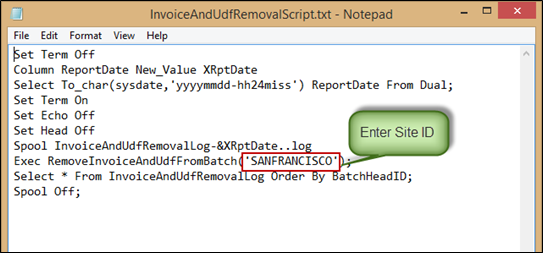
Multiple Site ID’s can be mentioned by comma separator as shown below.

-
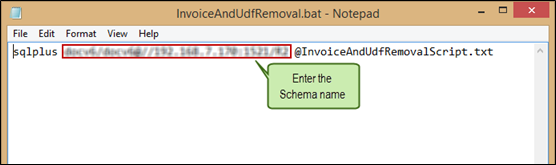
Open ‘InvoiceAndUdfRemoval’ batch file and enter the schema name.
-
Create a task through Windows Task Scheduler.
Set the time and upload the batch file so that Windows task scheduler runs at the pre-set time.
-
In Invoicing module, add Unposted Invoice to the Unposted AR Invoice batch.
-
When the batch file runs at the pre-set time mentioned in the windows task scheduler, it looks for the unposted Invoices present within the un-posted AR Invoice batches. It searches for the site that matches with the Site IDS passed in the script. Then, removes them from the respective batches.
For example:
If the user has passed two Site IDs (Ex: Site ‘A’ and Site ‘B’) in the script and when the windows task scheduler runs, it searches for the unposted batches in both the sites. If Site ‘A’ has unposted batches and Site ‘B’ doesn’t contain unposted batches. Windows task scheduler removes only the batches in Site ‘A’.
-
It creates a log whether it is pass/fail and reason for the same as shown below.
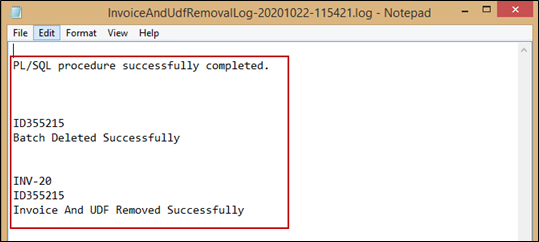
Once the Invoices present in the batch removed, system deletes the empty batch.
-
The history of the batch deletion will not be available in the system.
-
The log files shows ‘Batch is in Use’/’Invoice is in Use’ when the Invoice/Batch is being used by the user.
-
The log file shows ‘No Rows selected; when the unposted batches are not available in the respective Site ID mentioned in the script.