
Reference No: 29261
Details
The custom report generated using Rep_CrewOrderLaborPerdiemView is used to view the Per Diem details entered from the R2 Labor. The details are explained in the sample workflow given below:
Prerequisites
-
Select the Maintenance module > Labor tab > click the New icon.
-
Create the Labor Position [AUDIOASSIST].
-
Save and Exit the Maintenance module.
Sample Workflow
-
From the R2 application, select the Account module. The Account window is displayed.
-
Tag a Company [LG].
-
Click the Reservation icon. The Order Information dialog box is displayed.
-
Create a Rental Reservation Order [ORD-2110] for 1 day duration.
-
Select the Sales Person importable button. The Employee window is displayed.
-
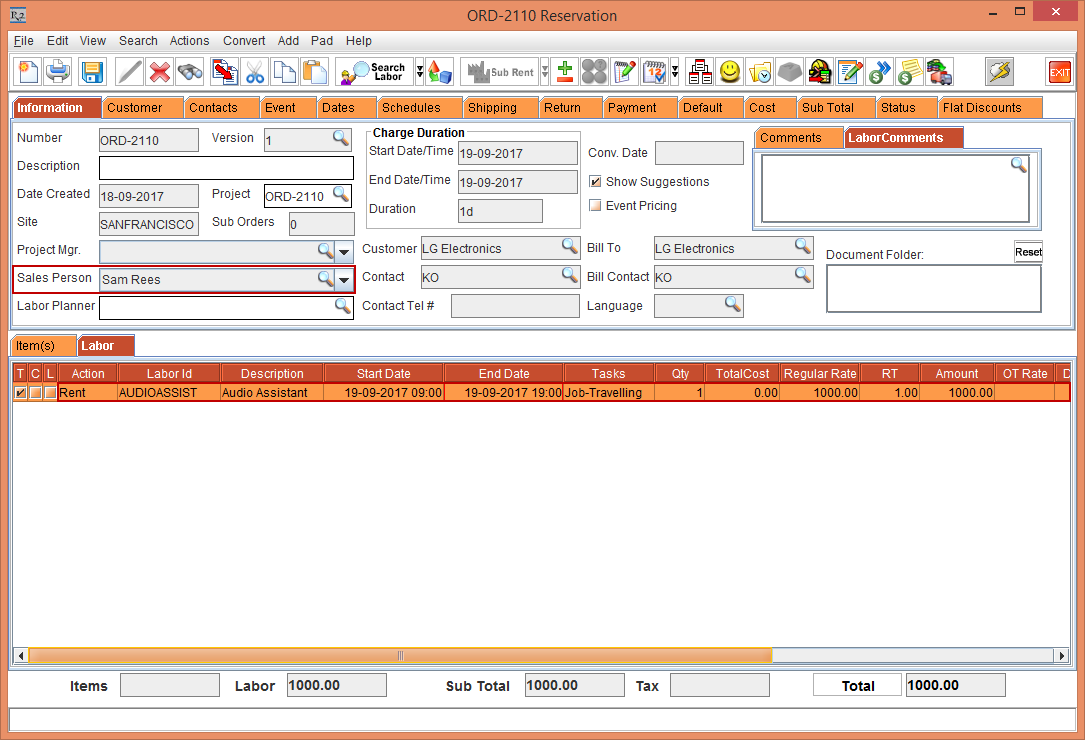
Select and tag the Employee [Sam Rees], as shown in Figure 1.0.
-
Select the Labor tab.
-
Click the Search Labor icon. The Search Labors window is displayed.
-
Search and add the Labor Position [AUDIOASSIST] and add a Schedule and tag the Task as [Job] to the Labor Position [AUDIOASSIST], as shown in Figure 1.0.
-
Save and Exit the Rental Reservation Order [ORD-2110].
-
Login to R2 Labor > Planning tab and search and open the Order [ORD-2110].
-
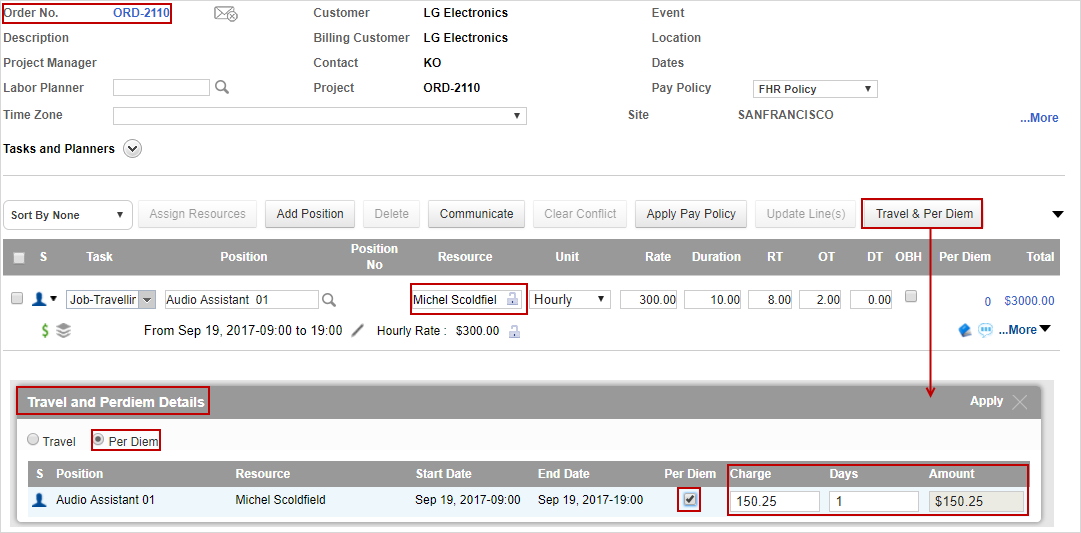
Open the Order [ORD-2110] > add a Resource [Michel Scoldfield].
-
Click the Travel & Per Diem button. The Travel and Perdiem Details dialog box is displayed.
-
Select the Per Diem radio button > select the Per Diem check box. The Charge is displayed as 150.25, Days as 1 and Amount as $150.25.
-
Click the Apply button. The Charge, Days, and Amount is applied to the Task, as shown in Figure 1.1.
-
Click the Save & Exit button.
-
Select the Reports module and generate the Rep_CrewOrderLaborPerdiemView Report
-
The Rep_CrewOrderLaborPerdiemView Report displays the Cost [150.25], Days [1], Resource [Michel Scoldfield], Sales Person [Sam Rees], and Total Cost [150.25]. The Total Cost is calculated as Total Cost X Days i.e., 150.25 X 1 =150.25, as shown in Figure 1.2.
