
Reference No: AHI-6
Version No: 06.01.02-00
Details:
This functionality works in the following sequence.
-
Below changes are made to Summary Invoice Support to Create a Summary Credit or Summary Debit automatically when a Summary Invoice is credited or debited.
-
Based on Type of Summary Invoice (Invoice, Credit or Debit) the appropriate IDS will be assigned on posting.
-
Support to identify and set sub type for a Summary Invoice as: Invoice / Credit / Debit.
Design Changes:
-
In the 'Configuration Module', the flag 'Allow to add CR/DB Memo to Summary Invoice' has been removed. Instead a drop-down list named Summary Type is added in Summary Invoice Screen. This will have following values - Invoice, Credit, Debit. [See Section: Support for Summary CR/DB]
In the same screen, Summary Credit/Debit Memo is searchable using the 'Summary Credit/Debit ID' in the 'Invoice ID' field.
Functional Changes:
-
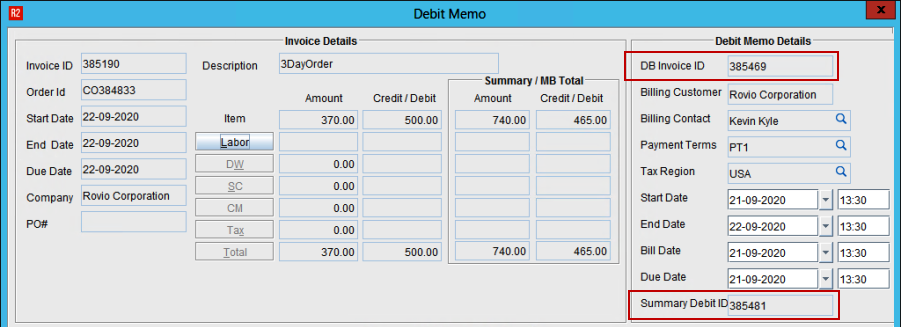
Summary Credit/Debit ID Field has been added in the Credit/Debit Memo Screens respectively.
-
When Summary Invoice Screen loads, the Default 'Summary Type', will be Invoice. This later-on can be changed, or changes automatically based on Credit/Debit Invoices being generated/displayed.
-
Invoice/Credit/Debit type have been supported in SAP-F2 export. [See Section: Integration With SAP-F2]
Workflow #1:
-
Open a posted Summary Invoice batch having few Invoices
-
Raise a Summary Credit and Summary Debit memo for the Summary Invoice
-
This will create a Summary Credit [See Figure 1.0] and Summary Debit [See Figure 2.0] automatically as shown below

-
Post the Summary Credit Memo and Summary Debit Memos using the Summary Credit and Debit IDs
-
Upon Posting, Summary Credit Memo [See Figure 3.0] and Summary Debit Memo [See Figure 4.0] will consume the ID from the respective IDS set for these types
-


Upon creating Summary Invoice batch, if Summary Credit or Summary Debit has to be generated manually, appropriate Invoice Type must be selected manually.
Support for Summary CR/DB
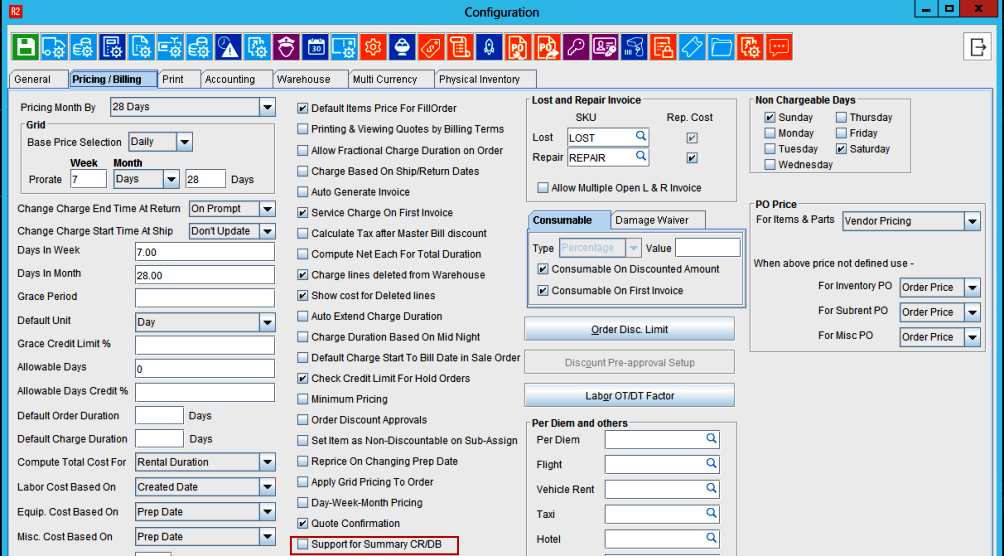
‘Support for Summary CR/DB’ field is added in the Configuration module under Pricing/Editing tab.
-
This flag will be false by default
-
‘Support for Summary CR/DB’ flag must be enabled
-
Select the ‘Support for Summary CR/DB’ field
-
A pop-up displays as shown below with “Yes” and No” options

-
If ‘Support for Summary CR/DB’ flag is disabled, Type field in the summary Invoice will be disabled.
Hence, user will not be able to create Summary Credit/Summary Debit memo manually.
Integration With SAP-F2
For this enhancement, a new field has been added in the interface file to cover the business requirements of compatibility with SAP-F2.
This field will be part of the SAP table to determine the GL Account.
The new value to be included in the SAP Invoice Interface is to contain a total of 5 segments.
-
Each segment is a total of 2 alpha-numeric characters.
-
All segments are concatenated together upon export from R2.
-
Segment 1: ”Special Product” segment.
-
If the “Commission Group” from the item edit screen is populated, the first two characters from the COMMISSION GROUP ID (starting from left side), are used upon concatenation and export.
-
If the COMMISSION GROUP field is not populated, the default value is taken from the COMMISSION GROUP value on the order header.
-
If the COMMISSION GROUP field is blank, it defaults to “00”
-
Segment 2: "Line Level" status segment.
-
ARRI Owned Equipment = “00”
-
Sub-Rents = “01”
-
Consignment = “02”
-
Segment 3: "Invoice Type" segment
-
Invoice / Summary Invoice / Credit / Debit = "00"
-
LR Invoice = "02"
-
Sale Invoice = "01"
-
Segment 4: "Invoice Type" segment
-
If the Sub-Category of the Order Header is blank/null, then segment 4 = “00”.
-
Else, the system takes the first two alpha-numeric characters (Left-to-right) from the Sub-Category ID upon concatenation and export for the fourth segment of the new value.
-
Segment 4: "Reserved For Future" segment
-
The fifth segment is for future use (undefined as of today), and is always Hardcoded with a value of “00”.