
Depreciation Summary By Current Site report can be generated to view the Summary of Depreciation of a particular year in the Current Site
To generate Depreciation Summary By Current Site Report
-
Access Report Module in R2 Launch Pad
-
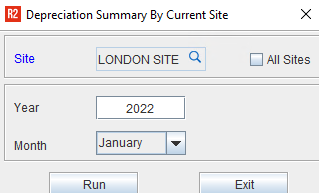
Select Depreciation > Depreciation Summary By Current Site to display Depreciation Summary By Current Site Report options dialog where in you can define the options to generate the report.
-
Select the required filtering options.
-
Click Run to generate the Report.
Report Filtering Options
The report can be filtered by:
-
Site
-
All Sites
-
Year
-
Month
Depreciation Summary By Current Site Report options
Table 1.0: Report options
Report Options
|
Descriptions
|
|
Site |
This field allows you to select the Site for which you want to view the Depreciation Summary By Current Site Report |
|
All Sites |
Selecting the 'All Sites' check box will display the Depreciation Summary By Current Site for All Sites. |
|
Year |
Displays the year for which the report will be generated. |
|
Month |
Displays the month of the year for which the report will be generated. |
The report will be generated based on the 'And' condition between the filter options, i.e. Only the Orders which satisfy all the criteria set in the Report Filters will be considered for this report.
Report Field information
Table 1.1: Report field options
Information
|
Description
|
|
Header Level |
|
|
Year |
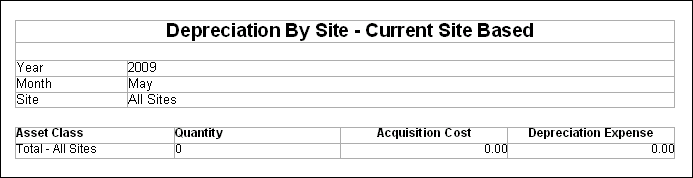
Displays the Year for which the report is generated |
|
Site |
Displays the Site for which the report is generated, if All Sites is selected in the report options dialog, then all sites will be updated in this field |
|
Grid Level |
|
|
Asset Class |
It will display the Department tagged to the item in Item Edit window |
|
Qty |
Quantity of the item |
|
Acquisition Cost |
The cost incurred while receiving the items |
|
Accumulated Depreciation |
Total Depreciation amount prior to the selected year |
|
Jan to Dec |
Depreciation value for the items in each month of the selected year. |
|
Expense or Year |
Total amount of Depreciation for the Qty in the entire year |
|
Accum Depreciation ending |
Accumulated Depreciation + Expense for the Year |
|
Net Book Value |
Acquisition Cost - Accumulated Depreciation |