
The replacement cost defined for the Item, Asset will be always considered for all the sites, and will be considered while applying Pricing Formula and Update Replacement Cost for the item.
Item Edit Window
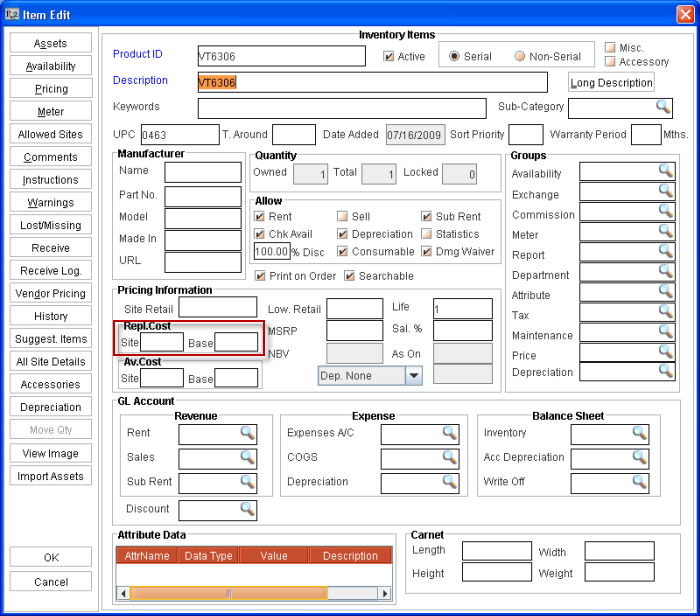
In Item Edit window, you can define the Site Currency and Base Currency based replacement costs in the Site and Base fields present in the Repl.Cost section (as illustrated below).
Points to Note
-
On entering Site currency based cost, system will automatically calculate the Base currency based replace cost, if any currency conversion definitions does exist for the site currency to base currency,
-
If there are no currency conversion definitions present from site currency to base currency, then the value defined for the site currency based replace cost will be displayed as the Base Currency based replacement cost.
-
The updated Replacement Cost in the Item Edit window fields (Site [ Site Currency based Replacement Cost] and Base [Base Currency based replacement cost] ) will be applicable only to the site in which the item is opened for editing
All Site Details
In All Site Details window, two new columns (Site Repl.Cost and Base Repl.Cost) is added, which can be used for the following :
-
View the Site currency and Base Currency based replacement cost for the different sites for the item
-
Define Site currency and Base Currency based replacement cost for different sites.
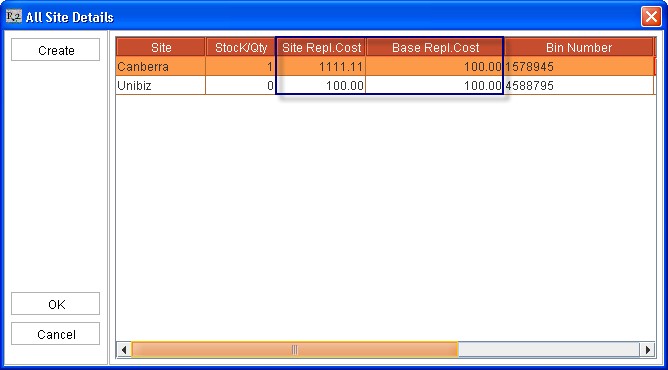
On selecting Create button to update the settings for Other Sites
-
If Apply Multi Currency is True, then, for the sites for which replacement cost is not defined for the item, system will default the last defined Base Currency based replacement cost as the Base Repl.Cost for the item and the Site Repl.Cost will be automatically calculated based on the conversion rates present.
-
Consider the Replacement Cost definition for an Item in the following sequence
-
|
|
Site |
Site Currency based Repl.Cost |
Base Currency based Repl.Cost |
|
1 |
Canberra |
25 |
75 |
|
2 |
Melbourne |
100 |
100 |
-
On selecting the create button, the Base Currency based Repl.Cost 100 will be defaulted for the item to the sites in which replacement cost is not defined. If no conversion rates are present, then the Base Repl.Cost will be displayed as the Site Repl.Cost for the Item.
Asset Edit Window
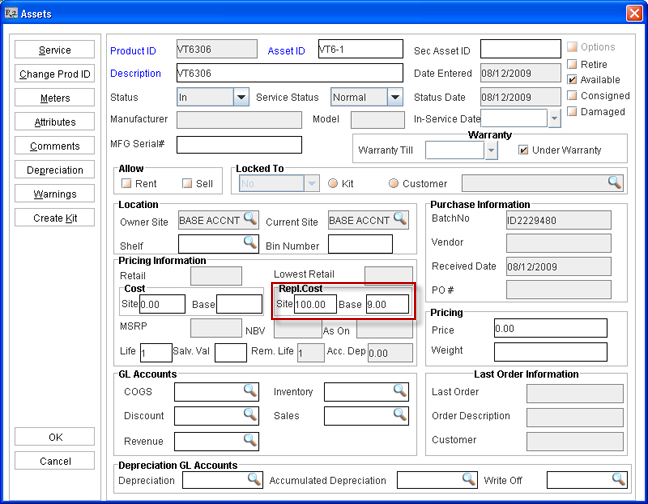
In Asset Edit Window, you can define the Site Currency and Base Currency based replacement costs for individual assets in the Site and Base fields present in the Repl.Cost section (as illustrated below).
Points to Note
-
On entering Site currency based cost, system will automatically calculate the Base currency based replace cost, if any currency conversion definitions does exist for the site currency to base currency,
-
If there are no currency conversion definitions present from site currency to base currency, then the value defined for the site currency based replace cost will be displayed as the Base Currency based replacement cost.
-
The updated Replacement Cost in the Asset Edit window fields (Site [ Site Currency based Replacement Cost] and Base [Base Currency based replacement cost] ) will be applicable only to the site in which the asset is opened for editing.
Kit/Package Edit Window
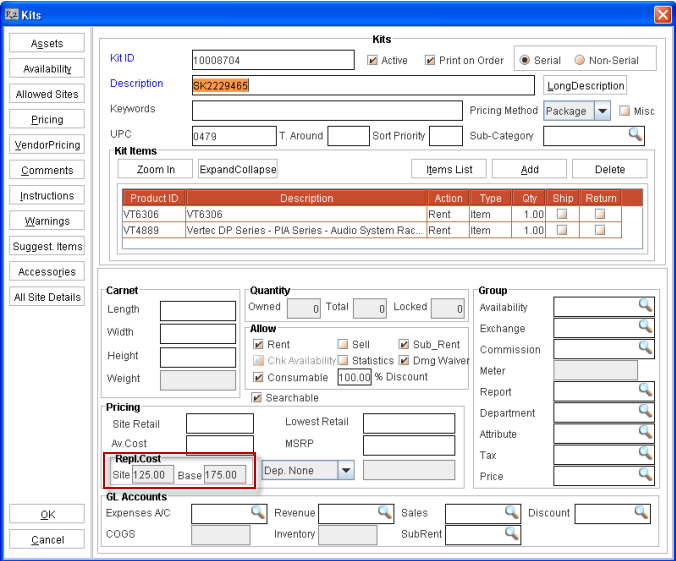
In the Kit Edit window, you can view the Site Currency based Replacement Cost and Base Currency Based Replacement cost for the items which are added to the Kit/Package in the Site and, Base fields (as shown below) which are present in the section Repl.Cost.
In the Site field, system will display the total replacement cost of items based on Site Currency and the Base field will display the total replacement cost of the items based on Base Currency.
-
Formula for calculating of Site Currency based Repl.Cost : Site Currency based Repl.Cost of Item x Item Quantity Defined
-
Formula for calculating of Base Currency based Repl.Cost : Base Currency based Repl.Cost of Item x Item Quantity Defined
Consider the following replacement cost definitions for an item
|
Item |
Quantity |
Site Currency based Repl.Cost |
Base Currency based Repl.Cost |
|
Item#1 |
2 |
25 |
75 |
|
Item#2 |
1 |
100 |
100 |
On adding the above items to a kit, the Site field will be displayed as 150((25 x 2)+(100x1)) and the Base field will be displayed as 250((75x2)+(100x1)).
On Applying Pricing Analysis Formula for an Item
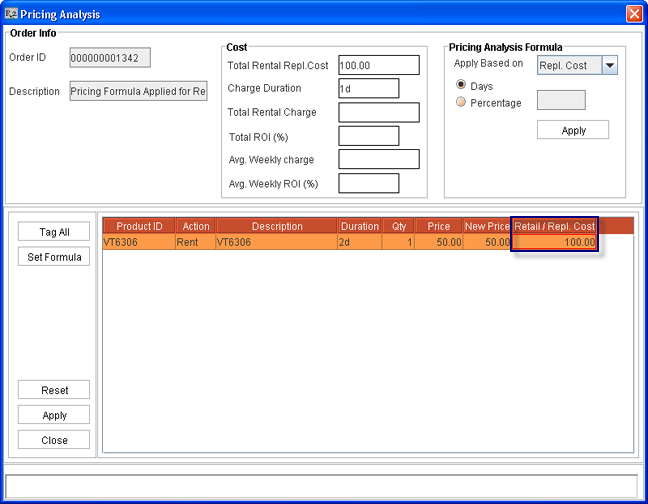
While applying pricing analysis formula (Action - Pricing Analysis) for an item with Apply Based on selected as Repl.Cost , the value displayed in the field Retain/Repl.Cost will be as follows :
When Apply Multi Currency set as true
The Retail/Repl.Cost will display the replacement cost based on Transaction currency which will be calculated as follows :
-
If Site Currency based Replacement Cost is defined then, the cost will be converted to Transaction Currency based cost based on the conversion factor present in the current order.
-
If Site Currency based Replacement Cost is not defined, but Base Currency based Replacement Cost is defined then the cost based on Base Currency will be first converted to Site Currency based Replacement Cost and then it will be converted to Transaction Currency based cost based on the conversion factor present in the current order.
-
On Updating Replacement Cost
While updating replacement cost for an item in a Order of type Contact or Sign-off, using the feature Action- Update Replacement Cost, the unit price will be updated with the Transaction Currency based replacement cost, which will be calculated as below :
-
If Site Currency based Replacement Cost is defined then, the cost will be converted to Transaction Currency based cost based on the conversion factor present in the current order.
-
If Site Currency based Replacement Cost is not defined, but Base Currency based Replacement Cost is defined then the cost based on Base Currency will be first converted to Site Currency based Replacement Cost and then it will be converted to Transaction Currency based cost based on the conversion factor present in the current order.
-
Replacement Cost without Multi-Currency Support (Apply Multi Currency set as False)
Item Edit Window
-
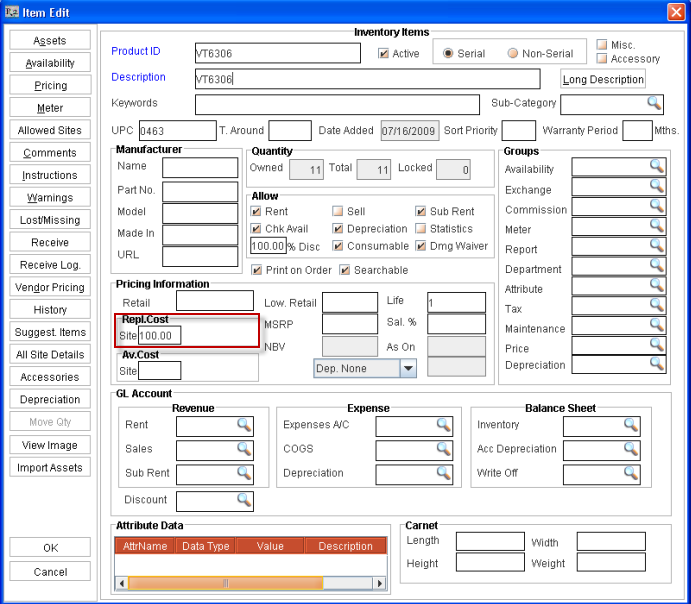
In Item Edit window, the field Site will be present (as shown above) wherein the user can enter the current Site based Replacement cost for the item.
All Site Details
-
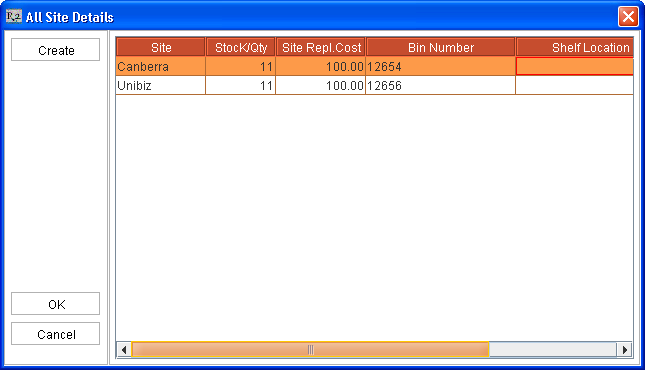
If Apply Multi Currency is False, then, for the sites for which replacement cost is not defined for the item, system will default the last defined Site Replacement Cost as the Site Repl.Cost for the item in the sites.
Consider the following Replace Cost definition for the Item
|
|
Site |
Site Repl.Cost |
|
1 |
Canberra |
25 |
|
2 |
Melbourne |
100 |
-
On selecting the create button, the Site Repl.Cost 100 will be defaulted for the item to the sites in which replacement cost is not defined.
Asset Edit Window
-
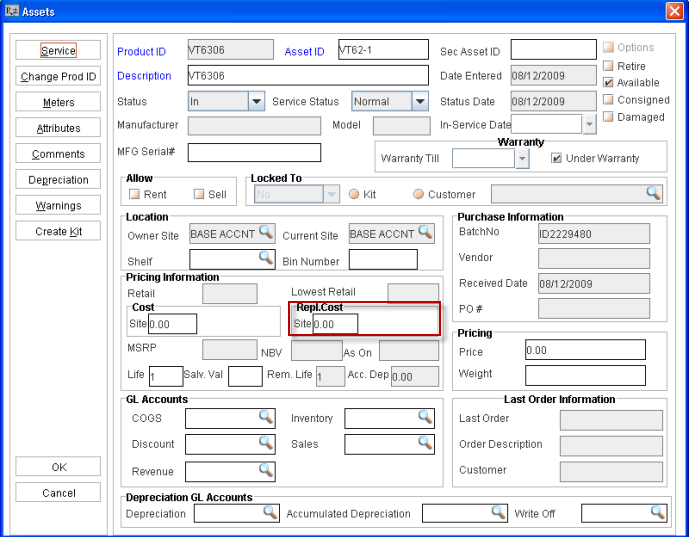
In Asset Edit Window, the user can enter Replacement Cost for an asset for the current site (Site in which the asset is opened for editing) using the Site field (highlighted above).
Kit /Package Edit Window
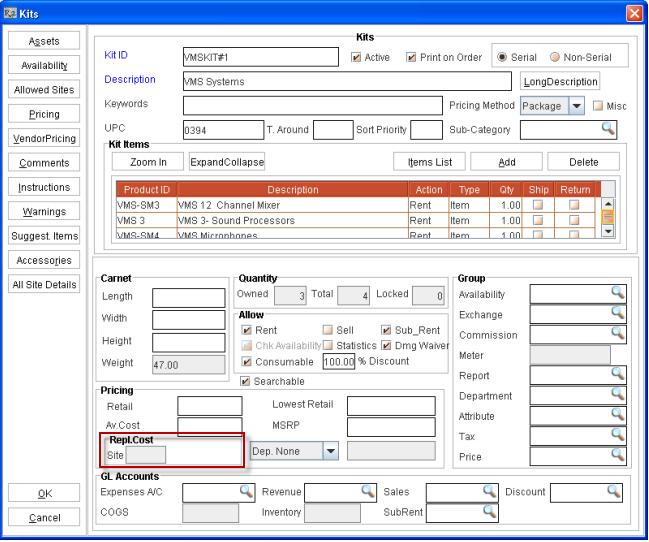
In Kit Edit window, the site field will display the sum replacement cost of the items added to the kit . The Replacement Cost for the Kit will be calculated as Repl.Cost of Item defined for the current x Item Quantity Defined, which can be further illustrated as below :
Consider the Replacement Cost definition for the items added to the kit in the current site as below :
|
Item |
Quantity |
Site Repl.Cost |
|
Item#1 |
2 |
25 |
|
Item#2 |
1 |
100 |
As per the above cost definitions present for the items ,the Kit Replacement Cost will be calculated as 150 [(25x2)+(1x100)]
On applying Pricing Analysis Formula (Using Action - Pricing Analysis)
-
On applying Pricing Analysis Formula , if any Replacement Cost is defined for the current site, the same will be updated in the Retail/Repl.Cost.
On Updating Replacement Cost (Action- Update Replacement Cost)
-
On updating replacement cost for an item in a Order of type Contact or Sign-off, using the feature Action- Update Replacement Cost, the unit price will be updated with the replacement cost defined for the current site, if any.
For more details on Multi-Currency feature in R2 click here.