
Content was last updated in 06.01.17-00
Revision History
Version No.
|
Reference No.
|
Changes
|
|
06.01.17-00 |
R2-17740 and R2-17895 |
Change in Design how PAT Testing is executed. |
|
NA |
NA |
Content ported from previous release pertaining to same topic. |
The following sample workflow displays the Asset's PAT Test effective date is not expired as of today but will expire on or before Order’s Return Date.
The flags ‘Validate for QC/Service on Fill’ and ‘Validate for QC/Service on Return’ in Configuration is set as selected.
Sample Workflow
-
Create a Serial Item [SR15408].
-
Tag a Maintenance Group [PERIODIC90DAYS] with Maintenance Schedule Periodic 90Days to Item [CRANE#1].
-
Receive an Asset [SR1540813000] for [SR15408] on 15 - April - 2021. Based on Maintenance Setup the asset will be on QC on 12 - July - 2021.
-
Create a Rental Reservation Order [ORDER#1] from 01 - July - 2021 to 20 - July - 2021.
-
Add 1 quantity of the Item [SR15408] to [ORDER#1].
-
On 30 - June - 2021, open the Prep Task of [ORDER#1] and scan the Asset [SR1540813000] to fill it. The system displays the prompt, as shown in the Figure 1.0.

-
Service Schedule displays the upcoming service schedules for the asset. The list shows the type, description and next service due date for all schedules. This enables you, to make an informed choice whether or not to proceed with filling of this asset, which is due for service. See Screenshot
-
Click on Yes will ignore the service schedules warning and fill the asset on the Order anyway.
-
Click on No will skip filling the asset. Now, you can proceed to perform the PAT Testing on the asset and import the result into R2. This will update the service date on upcoming QC service schedule to current date and subsequently push the next service date as per maintenance schedule. Later when you scan the same asset the system will consider the updated next service date and should allow you to prep the asset, provided that there are no more upcoming service schedules with due date falling before the return date of the order.
PAT results updates the next service date of only the QC schedules. It bears no impact on service schedules of type 'Need Service'.
-
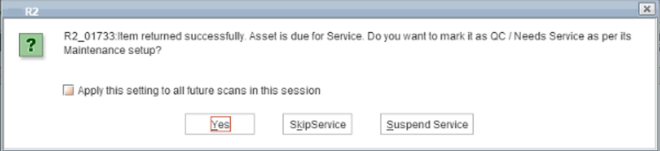
On the 20 - July - 2021, the Return Date of the Order, open the Return Task of the Order [ORDER#1] and scan the Asset [SR1540813000] to return. The system displays the prompt as shown in the Figure 1.1.
-
Click on Yes and Asset [SR1540813000] status will be marked as QC and returned.
-
Click on SkipService and Asset [SR1540813000] status will be marked as Returned, however its QC will be pending.
-
Click on Suspend Service will Create a Service Ticket of [SR1540813000] either by Quick Service Ticket or Normal Service Ticket to bring the Asset to IN status. However, it will not allow the asset to be added to any order further until its QC is in Done Status.