
Content was last updated in 06.01.17-00
Revision History
Version No.
|
Reference No.
|
Changes
|
|
06.01.17-00 |
R2-17740 and R2-17895 |
Change in Design how PAT Testing is executed. |
|
NA |
NA |
Content ported from previous release pertaining to same topic. |
When filling an Order, the user is prompted when an Asset’s PAT Test Effective Date will expire on or before the Order’s Return Date.
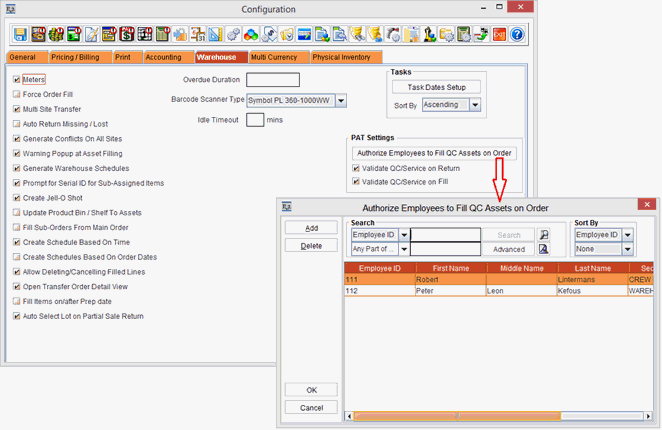
The PAT related settings are required to be done in Configuration Module and Site Edit window. This is, as shown in the Figure 1.0, Figure 1.1 and Figure 1.2.
The prerequisites are as follows:
-
The PAT related settings are required to be done in Configuration Module and Site Edit window (Refer Figure 2.1.0 and Figure 2.2.0), based on which the proposed implementation of the requirement is explained in the following sections:
-
Select the Maintenance module > Employee tab > Site > select the Site [SANFRANCISCO]. Enter 10 in the Show Warning On Return If QC/Service Is Required In Next Days field. This is as show in the Figure 1.2.
