
When returning an Order, the user is prompted if the Asset has an expiring PAT test effective date within the next ‘x’ days
Content was last updated in 06.01.17-00
Revision History
Version No.
|
Reference No.
|
Changes
|
|
06.01.17-00 |
R2-17740 and R2-17895 |
Change in Design how PAT Testing is executed. |
|
NA |
NA |
Content ported from previous release pertaining to same topic. |
When an Asset's Expiring PAT Effective Date is within next 'x' days, the user is notified by a prompt while returning the Asset in the Order.
The following sample workflow will displays how the prompt is displayed for an Asset's expiring PAT Effective Date.
Sample Workflow
-
Select the Configuration module > the Warehouse tab > select the check-boxes Validate QC/Service on Return and Validate QC/Service on Fill. This is, as shown in Figure 3.0. Save and exit Configuration module.

-
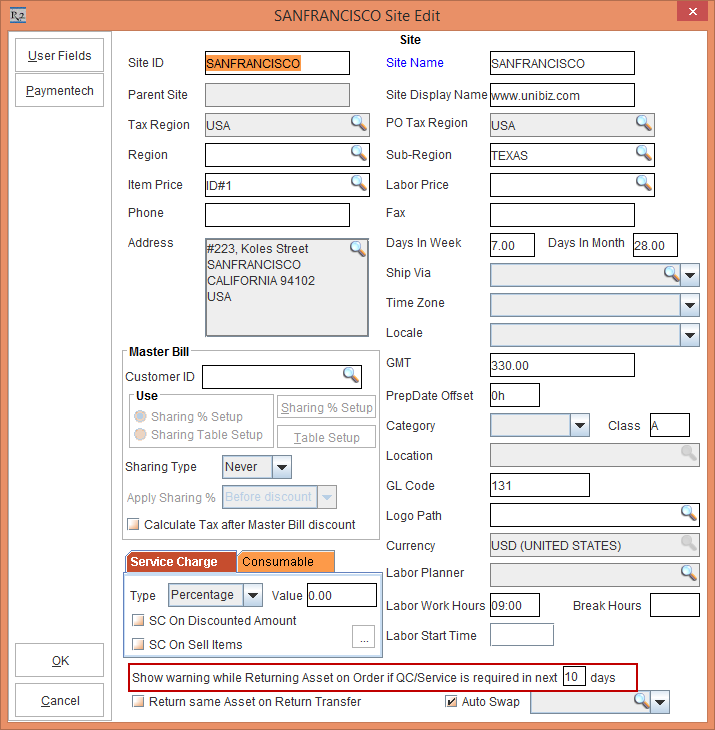
Select the Maintenance module > Employee tab > Site > select the Site [SANFRANCISCO]. Enter 10 in the Show Warning On Return If QC/Service Is Required In Next Days field. This is as show in the Figure 3.1.
-
Create a Serial Item [TOWERCRANE].
-
Tag Maintenance Group [PERIODIC90DAYS] with Maintenance Schedule Periodic 90Days to Item [TOWERCRANE] , as shown in the Figure 3.2.

-
Receive Asset [TOWERCRANE#1] for [CRANE#5] on 01 - March - 2017 in Site [SANFRANCISCO]. Based on Maintenance setup the Asset is on QC on 30 - May - 2017.
-
Create a Rental Reservation Order [ORD-1064]from 01 - May - 2017 to 20 - May - 2017.
-
Add the Item [TOWERCRANE] with Qty as 1.
-
On 01 - May - 2017, open the Prep Task of [ORD-1064] and scan [TOWERCRANE#1] and fill it. It gets filled successfully. Now, dispatch the Asset filled.
-
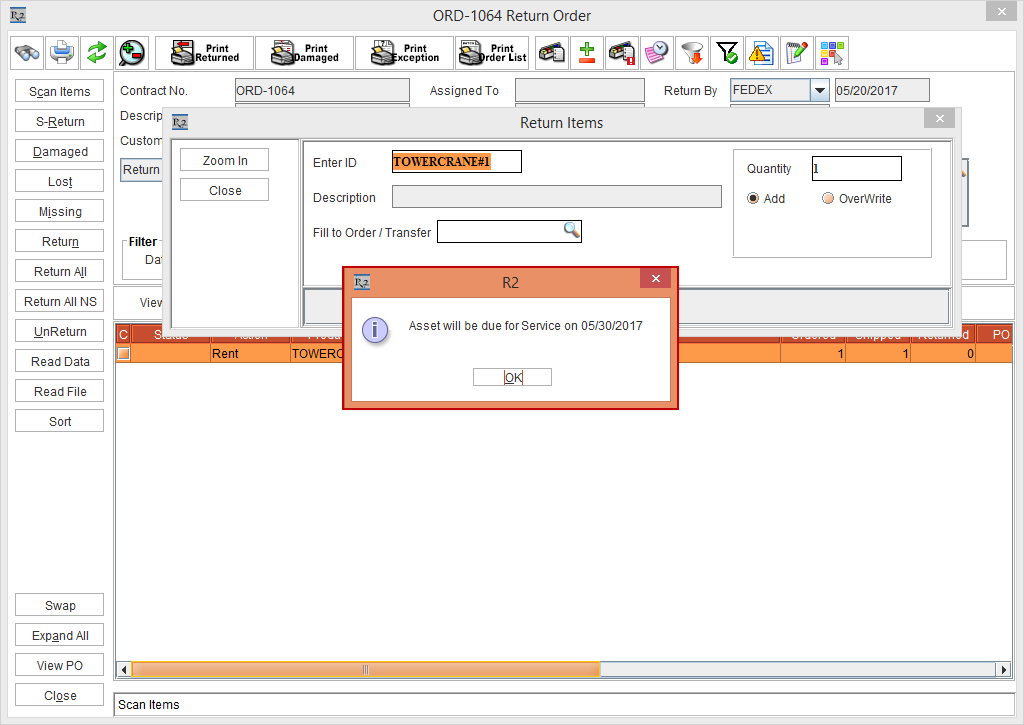
On 20 - May - 2017 which is the Return Date of the Order, open the Return Task of the Order [ORD-1064] and scan [TOWERCRANE#1] to return. Since the Asset [TOWERCRANE#1] needs a service in next 9 days based on its Maintenance settings of the Site [SANFRANCISCO] and the field Show Warning on Return if QC/Service is required in next __ days is set as 10 Days, the system displays the alert message as “Asset will be due for Service on 30th May 2017.” This is, as shown in the Figure 3.3.
-
Click the OK button.
-
The Asset [TOWERCRANE#1] will be returned on Order and its Status will be IN.
-
The Asset [TOWERCRANE#1] will be marked as QC when Generate Needs Service action is performed on 30 - May - 2017 or later or when user tries to fill it on Order.