
Table of Contents
In the Sort Tab you can decide and set how the fields will be sorted, i.e. in whether it will be displayed in ascending or descending order.
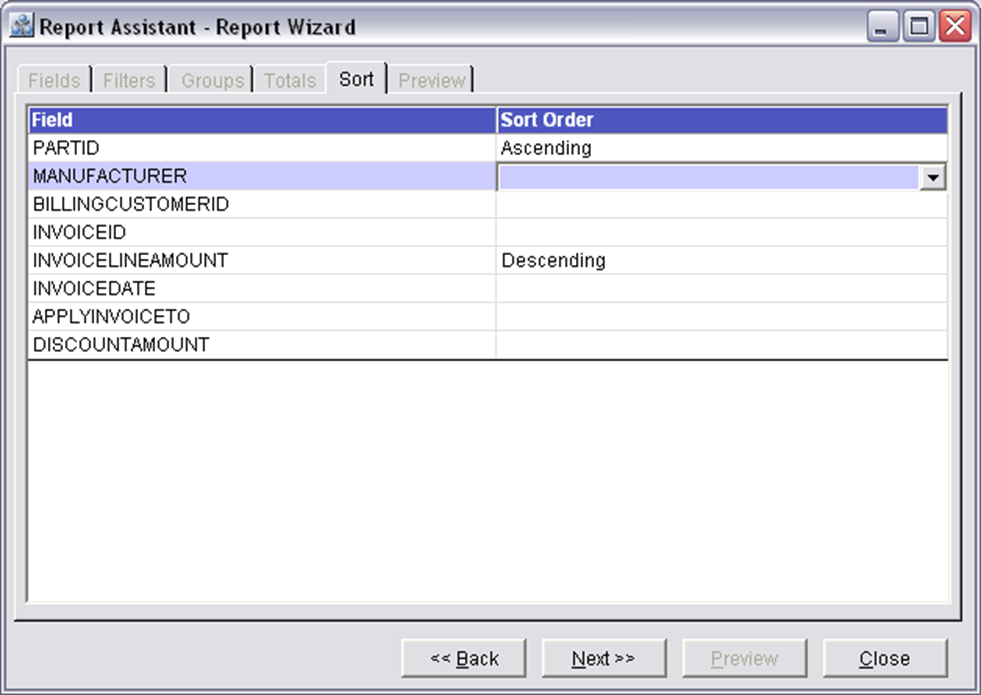
On clicking in the Sort Order column of the Sort Tab, a drop down list with the option Ascending, Descending and blank option will be displayed, selecting which you will be able to set the field whether to display the values of the field in ascending or descending order.
Column Information of Sort Tab
Field
Displays the selected fields of the report to be generated.
Sort Order
Displays two options 'Ascending' and 'Descending' in the drop down list by which the user will be able to sort the selected field in the respective order.
Button Information of Sort Tab
Back
On clicking the Back button the Totals Tab of the R2Reports Report Wizard window will be displayed
Next
On clicking the Next button the Preview Tab of the R2Reports Report Wizard window will be displayed
Close
Clicking on the Close button will close the Reports Report -Wizard window.