
Table of Contents
The Totals Tab displays all the fields that will be present in the report and you will be able to set the Sub Total if required for the fields or the groups.
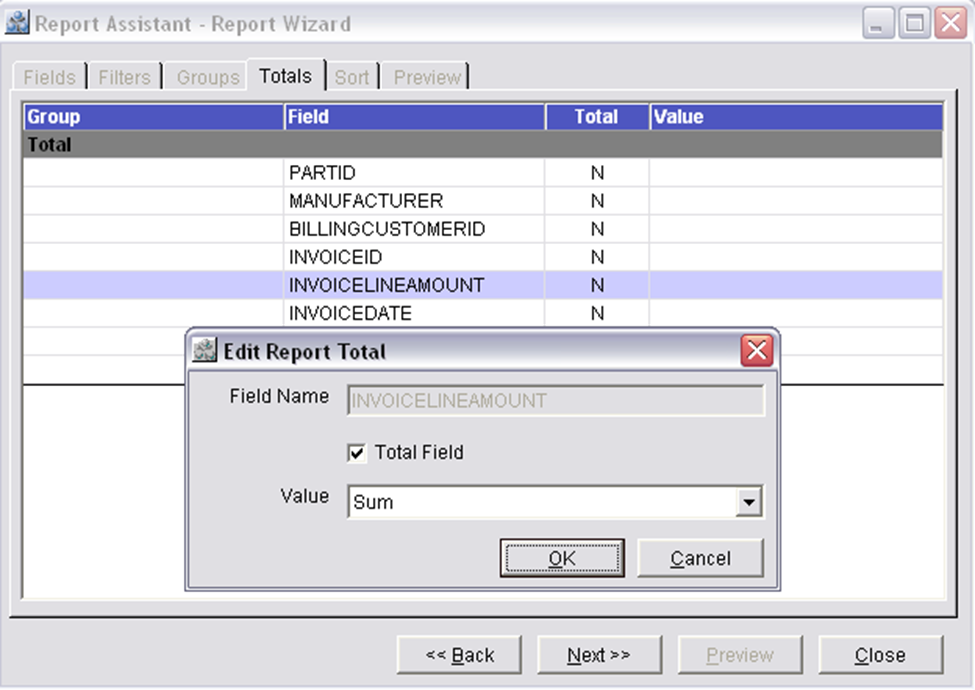
On double clicking a field in the grid of the Totals Tab, system will display the Edit Report Total dialog, wherein the selected field name and the value of the field will be displayed and you will be able to select or de-select the total Field check box.
Column Information of the Totals Tab
Field
Displays all the fields selected to be displayed in the Report.
Total
Displays 'Y' or 'N'. ('Y' is displayed if the sub total has to be printed for the field and 'N' is displayed if the sub total does not have to be printed for the field)
Value
Displays the value of the field i.e. Average, Count, Max, Min or Sum.
Button Information of the Totals Tab
Back
On clicking the Back button the Groups Tab of the R2Reports Report Wizard window will be displayed.
Next
On clicking the Next button the Sort Tab of the R2Reports Report Wizard window will be displayed.
Close
Clicking on the Close button will close the R2Reports Report Wizard window.