
Reference No: MAIN-46
Version No: 06.01.04-00
Details:
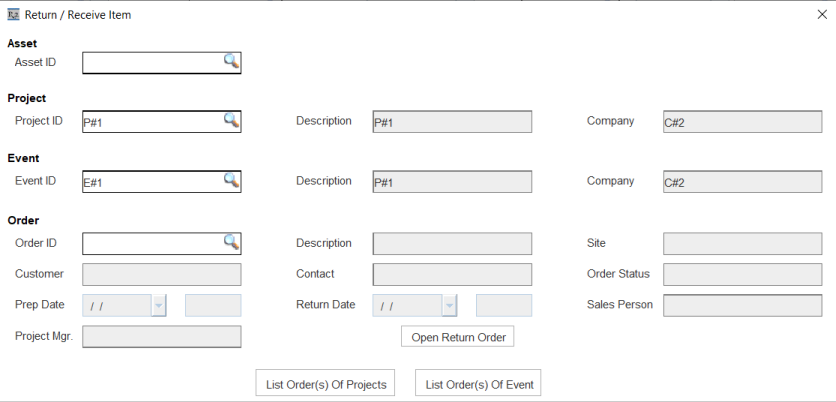
This feature supports two new columns ‘Event ID’ and ‘Event Name’ in the grid search filter of Return/Receive Items Window.
Thus, the users can filter the orders based on the Event ID/Name by selecting the Project.
Additionally, there is a provision to use Event ID/ Event Name as a search filter in Return/Receive Item window.
Before removing the 'List Order(s) of Event' button from Return/Receive Item window through Screen Design feature, expand the window and then remove the 'List Order(s) of Event' button otherwise window will not appear in properly when opened.

Functionality Covered
Option to search by Event ID and Event Name is provided in Return/Receive item window. See Image 1
Pre-requisites
-
Create a Project say Pro#1.
-
Create an Event say EV#1, set Project=Pro#1.
-
Create an Event say Ev#2, set Project=Pro#1.
-
Create a Serial Item say PI#1 receive 2 qty.
-
Create a non-serial Package say Pack#1 >> tag PI#1.
Sample Workflow
-
Go to Accounts and tag event EV#1. Create reservation say Order#1, project=PRO#1.
-
Add Pack#1 > fill and ship Pack#1 with Asset PI#1-1 > save and exit Order#1.
-
Go to Accounts and tag event EV#2. Create reservation say Order#2, project=PRO#1.
-
Add Pack#1 >> fill and ship Pack#1 with Asset PI#1-2 >> save and exit Order#2.
-
In Warehouse module, under Action > Return/rReceive items, tag PRO#1
-
Click 'List orders of Project' .
-
Search by Event Name/Event ID (Newly provided search fields) of Event EV#1 and tag the Order Order#1.
-
Click on Next to open Return Multiple Order window.
-
Expand Package Pack#1 and set Swap option to ‘Auto Swap’ and scan PI#1-2.
-
System will auto swap without any prompt since scanned asset order is belongs to the order of the tagged project and you have chosen ‘List Orders of Project’ for opening the Return Multiple Order window.