
Reference No: R2-13704
Version No: 06.01.00-00
Details
Asset locked to Kit can be viewed using “Locked To” option in Search filter of Search Assets window.
Assets that are locked to a Serial Kit can be searched by using filters like “Locked to Asset ID” and “Locked to Asset Description”
Prerequisite:
-
Serial Item with an Asset
Example:
-
“Soldering Pin” (Serial Item) “SR690614” (Asset ID)
-
“Pump Soldering” (Serial Item) “SR690691” (Asset ID)
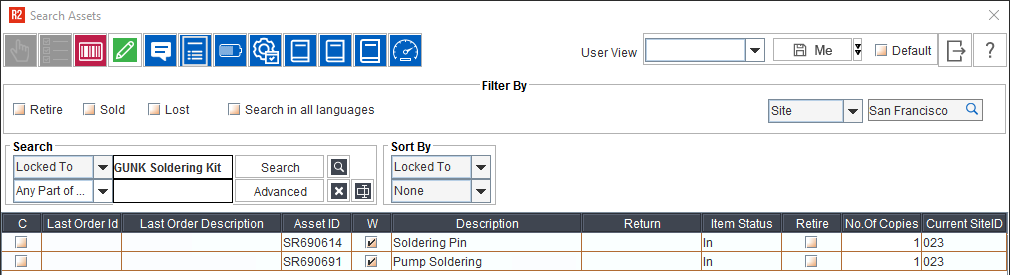
-
Above Assets are tagged to a Serial Kit and Asset ID as mentioned below
Example: “GUNK Soldering Kit” (Serial Kit) and “SR690758” (Kit ID)

Sample Workflow:
-
Navigate to Accounts > Search Assets.
-
Select Locked To Kit/Desc option from the drop-down.
-
Key in the Kit ID/Kit Description.
The application shows all the Assets locked to the Kit ID/Kit Description that was searched.
