
Reference No: 28827
Details
Support is provided for Day-Week-Month Pricing at Order level.
-
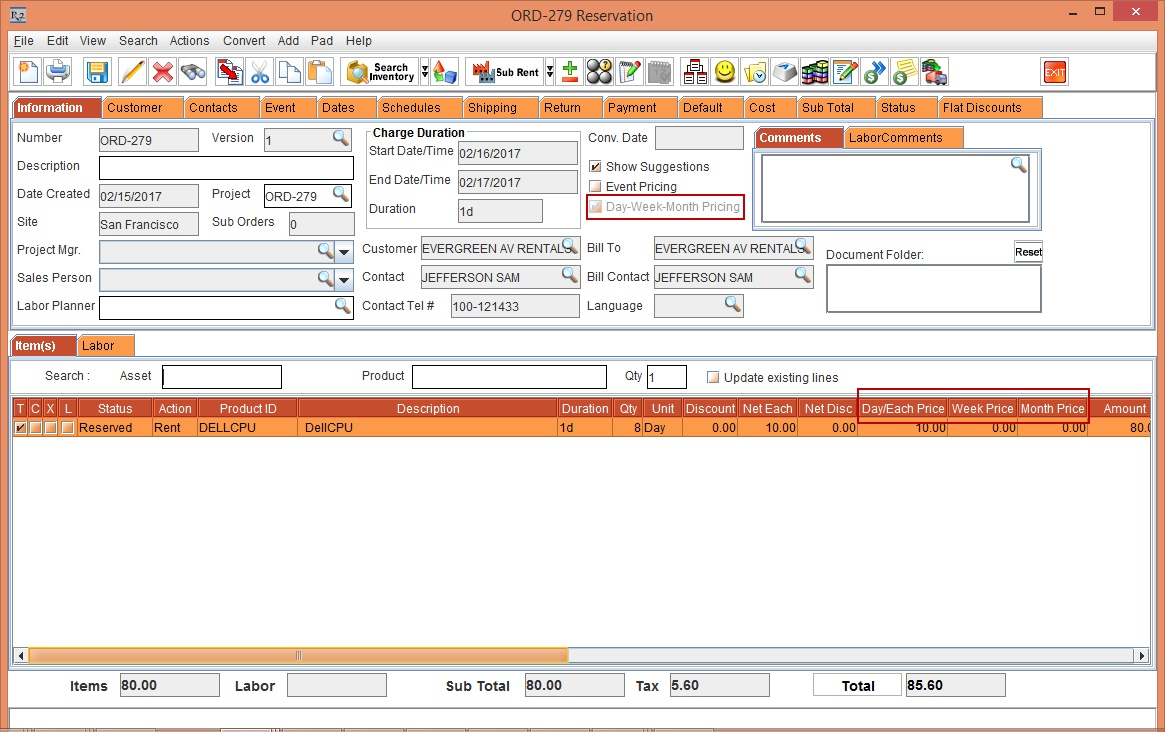
When the Day-Week-Month Pricing is enabled at Configuration level, the Day-Week-Month Pricing setting is defaulted as selected in the Order in Formation dialog while creating new Orders.
-
If the requirement is single Unit Price based billing, you can de-select in the Order in Formation dialog while creating new Orders.
-
Once the Order is created, the Day-Week-Month Pricing setting is available for viewing purpose only.
-
Click here to know Day-Week-Month Pricing .
Sample Workflow
Prerequisite
-
From R2 database, run the following query to enable the Day-Week-Month Pricing functionality:
update configuration set CHARGEBASED_DAYWEEKMONTHPRICE='1';
commit;
Scenario
-
From Account module, click the Reservation icon. The Order in Formation dialog is displayed for creating Rental Order will be displayed.
-
The check-box Day-Week-Month Pricing is selected by default. This is as shown in Figure 1.0.

-
Click OK button. The Rental Reservation Order [ORD#1] is created with Day-Week-Month Pricing selected.
-
Add an Item [DELLCPU] with Qty as 8. Observe that the Rental Reservation Order appears to be having Day-Week-Month Pricing . This is shown in Figure 1.1.
For more in Formation on Day-Week-Month Pricing click here
-
Fill and Ship the Item.
-
Set Billing Type, Pay At as Rent / Return / Periodic Billing.
-
Generate and post the Invoice.
-
-
The Day-Week-Month Price billing holds good for Rental Orders only..
-
If the Configuration flag, CHARGEBASED_DAYWEEKMONTHPRICE is false, then the system does not display the Day-Week-Month Pricing check-box while creating Orders. It will be always considered as not-selected.