
In R2 Launch Pad, select Account to open the Accounts Module.
-
Activate Event Tab by clicking on the tab name.
-
Select an Event either by using Search > Event feature or by entering the Event ID or Description in their respective fields.
-
Select File > New > Meeting Order from the menu bar or Click on Meeting Order Icon

-
R2 will display Meeting Order Window screen wherein you can organize the items, sessions and rooms for the Meeting Orders.
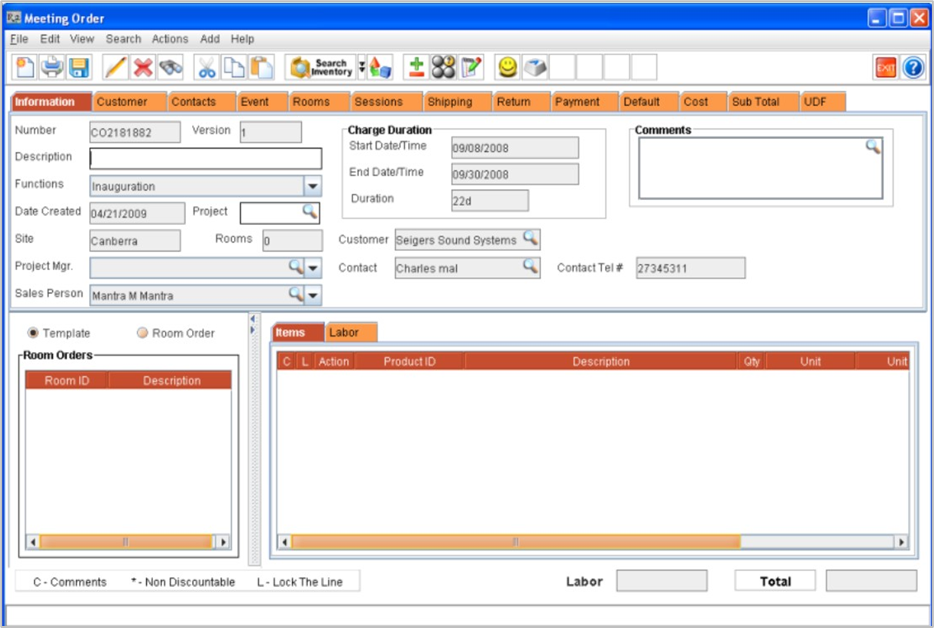
By default, the R2 will auto-generate the sessions for Meeting Orders based on the Event Duration. Each day in the Event will be considered as a Session, which can also be edited later. You can Add, Edit, and Delete Sessions from the Meeting Order Sessions Tab.
For other details on Meeting Order in R2, click the below links:
-
Meeting Order Tabs
-
Meeting Order Reports