
The Default tab in the Meeting Order window displays the default information for the order, usually based on the selected customer file settings. Exceptions include Profit Center, which is based on the salesperson’s Employee setting. Default Unit which is based on the setting in Configuration and Valid Till which must be entered for each order. Use the Default tab to view or change default settings for this order.
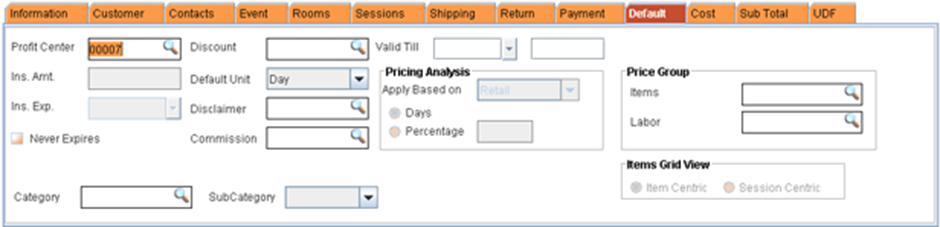
· Profit Center: This field shows the profit center assigned to the order. Typically profit centers are useful for tracking profits for distinct operation divisions within your business that share the same inventory. The profit center is defaulted from the default settings of the employee creating the order, if any, will be the default value here.
Note: A profit center must be assigned before an order can be converted into an Invoice.
· Valid Till: The Valid Till field determines the time and date when the order (Quote, Reservation or Hold) becomes invalid.
· Discount: If the Customer for whom the order is created belongs to a Discount Group, then the description of the group will be displayed here. You can add a Discount Group here.
· Valid Till: Use this field to indicate the last day quote pricing is valid. This date appears on printed orders.
· Default Unit: This field determines the default pricing unit for items, if periodic billing is applied to this order. The Default Unit selected in the Configuration module appears here. To change how pricing is calculated for this order, click on the down arrow to the right of the field and select a new Unit.
Note: This default only applies if unit pricing exists for that item, otherwise R2 will use the item pricing available.
· Commission: Displays / allows the user to select commission group
· Price Group: Displays the price group selected for the order
· By default, the Items price group and labor price group will display the Price group which is defined for the customer.
· When an even is tagged to the order, the Item group and Labor group will be defaulted from the event definition
· Item Grid View: Changes the item grid view in the meeting order based on the option selected. The item grid view options will be disabled on selecting Template Tab. more