
The Shipping tab is used to record the delivery destination for items on an order. The Location and Address may be automatically filled in with either the Customer's default shipping address or the Location selected from the Event tab. If neither a default Shipping address or Event Location is not selected for the Order, Shipping information must be given before the order can be processed.
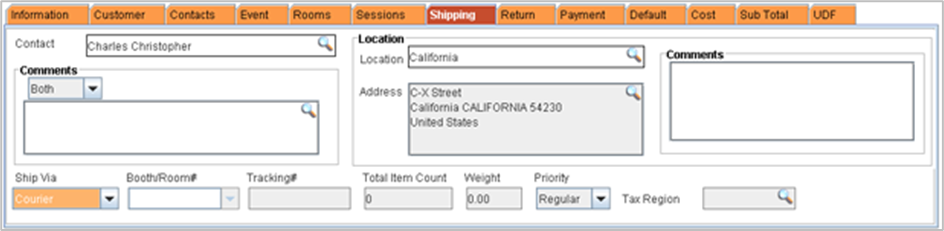
To change or select Shipping Location
-
From the Order window, select Shipping Tab
-
Click on the import button next to the location field
-
R2 will display the locations window
-
Search for the desired shipping location
-
Double click on the location name to select as the shipping location
-
Location name, address and the comments defined for the location (if any) will be displayed in the Shipping Tab
Shipping tab - Fields Information
· Contact: Displays the information about the person responsible for fulfilling orders that require shipment. The shipping contact can be changed from company-contact window which can be invoked by clicking the import button available in the contact field.
· Comments: Displays the comments created for shipping. Shipping comments can be created either individually for Pick list print and Delivery Receipt or common for both by selecting the appropriate option from the dropdown menu.
· Location: Displays the shipping location selected. Shipping location can be changed from the locations window which can be invoked by clicking on the import button in the location field
· Address: Displays the address of the shipping location. By default, address field displays the Main customer - Contact Shipping address. Shipping address can be changed from the Address window which can be invoked by clicking on the import button in the address field.
· Comments: Displays the comments defined for the shipping location
· Ship Via: Displays the Transit mode of the order. You can pre-define Transit mode in configuration module -> Carrier Types.
· Booth / Room #: Displays the booth number defined by the user from either the Event Tab / Shipping Tab.
· Tracking #: Displays the Tracking number defined in the Shipping order
· Total Item Count: Displays total number of items in the order
· Weight: Displays the total weight defined for the items in the item-edit screen.
· Tax Region: By default, Tax region displays the Tax region which is tagged to the order site. If location is tagged, the Tax Region which is tagged to the location will be displayed.