
Content was last updated in 06.23.07-00
Revision History
Version No.
|
Reference No.
|
Changes
|
|
06.23.07-00 |
R2-19956 |
Separating Lost/Missing items in Configuration. |
In this section the general information related to order such as Prompts, Mandatory PO fields, Mandatory voucher fields, Order sorting options, Transfer order info options, flow sheet print options are set by employee if any option in these fields are selected there must be values given while creating order.
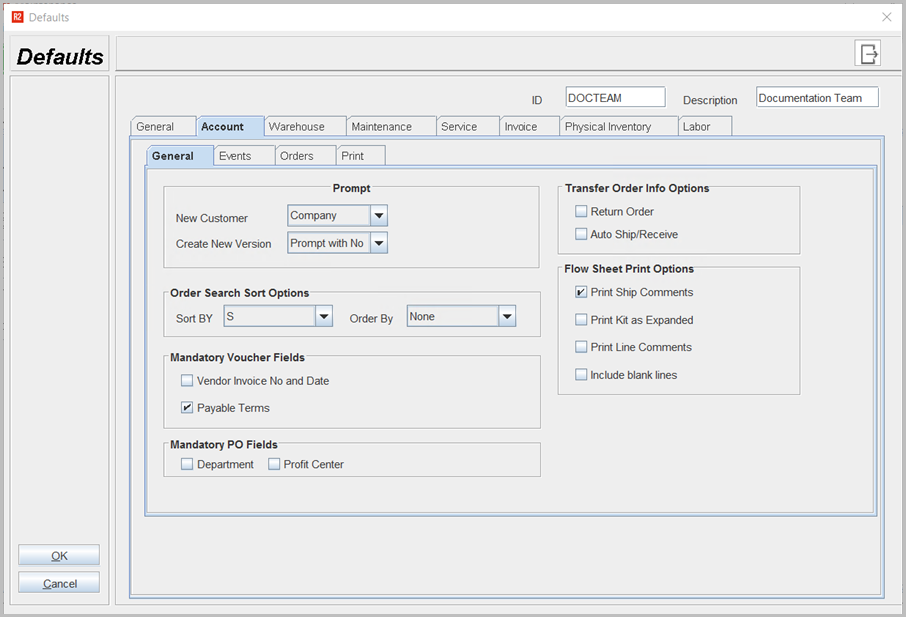
Table 1.0 Account > General Tab
|
Fields |
Sub-fields |
Field type |
Description |
|
Prompt |
New Customer |
Select from Drop down |
Employee can select New Customer, whenever creating new customer prompts a message with selected customer type such as
|
|
Create New Version |
Select from Drop down |
Whenever creating a new version of order a prompt displays options with Yes, No, or no prompt, this prompt can be set be employee who is creating an order. |
|
|
Order Search Sort Options |
|
Select from Drop down |
You can sort orders by selecting the options Sort by - Order ID, Company Status, Description, Department, Container, Priority etc Order by - Ascending or Descending order. |
|
Mandatory Voucher fields |
|
Select check box |
The employee can set vendor invoice number and date and also payable terms in any order. |
|
Mandatory PO fields |
|
Select check box |
The PO fields can be set as mandatory either Department or Profit Center or both can be set as mandatory. |
|
Transfer Order Info Options |
|
Select check box |
Employee can set any of the transfer order as mandatory they are Return order details, Auto ship/ receive order. |
|
Flow Sheet Print Options |
|
Select check box |
The printing options can be set to make any of the details to be printed on invoice. |